Disclosure: This article contains affiliate links for SkedCast and Sprout Social. If you buy through them, I may earn a commission at no extra cost to you. I only recommend tools I’ve researched carefully, and my opinions are my own. Read the full disclaimer.
Sprout Social is one of the biggest names in social media management. Large brands use it to schedule posts, answer customers and report results to their bosses.
But it’s also one of the most expensive tools in its category, and its pricing works per seat. Every person on your team pays a full monthly fee.
In this guide, Sprout Social explained in plain English: what it does, the networks it supports, its real 2026 prices (annual and monthly), the trial rules and who it actually suits.
I’ll also show why many freelancers and agencies get better value from SkedCast, a flat-priced scheduler built for managing many client accounts.
Quick answer
- What it is: an all-in-one social media management suite for publishing, engagement, analytics, listening and customer care.
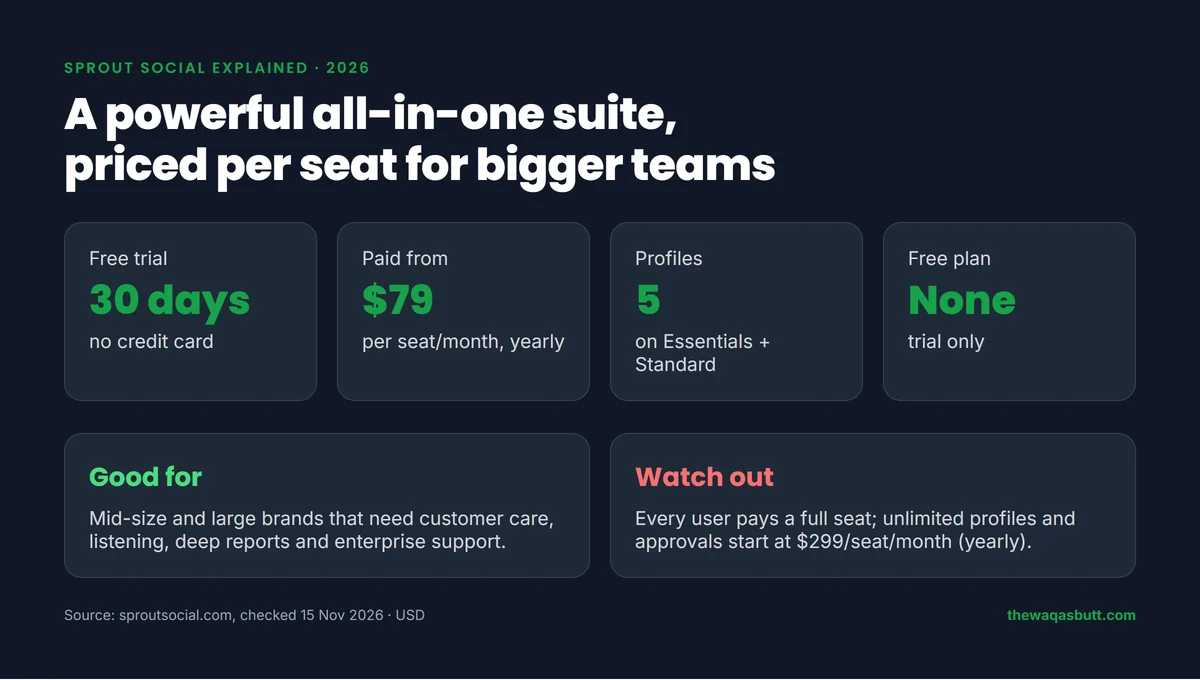
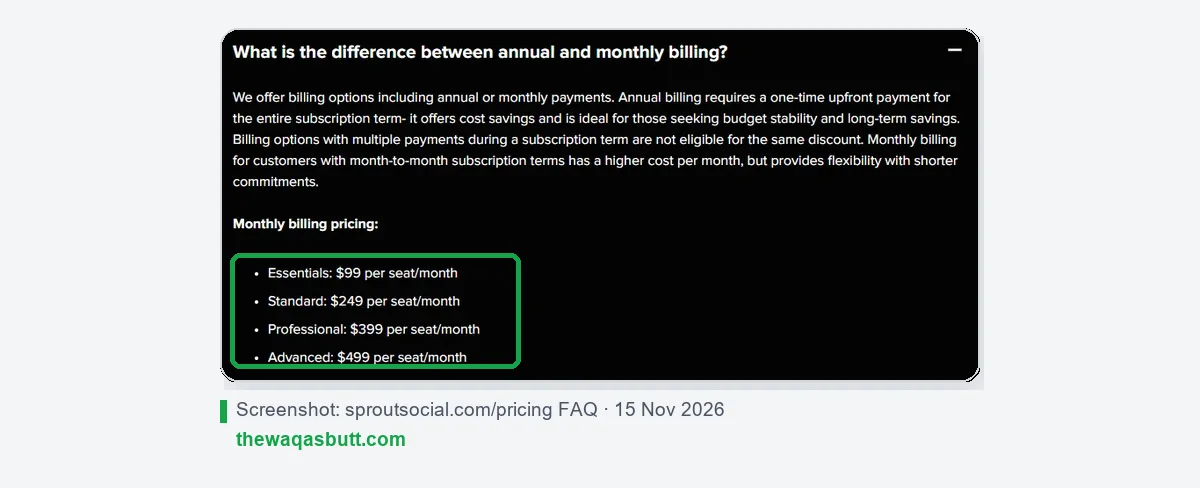
- How it’s priced: per seat, per month. Essentials $79, Standard $199, Professional $299 and Advanced $399 on annual billing; $99, $249, $399 and $499 on monthly billing.
- Free plan: none. There’s a 30-day free trial with no credit card.
- Best for: mid-size and large brands that need customer care, listening and advanced reporting.
- For agencies on a budget: SkedCast costs from $15 a month in total, not per seat.
In this guide
- What is Sprout Social?
- How I researched this guide
- How Sprout Social works
- Sprout Social’s main features
- Which networks does Sprout Social support?
- Sprout Social pricing in 2026
- Free trial and billing rules
- Sprout Social pros and cons
- Who Sprout Social is for (and who it’s not)
- Sprout Social vs SkedCast: the better value for agencies
- How to get the most from the 30-day trial
- What other Sprout Social guides get wrong
- Practical tips before you start
- Final thoughts
- FAQ
What is Sprout Social?
Sprout Social is a social media management platform. Its homepage describes it as “powerful tools for social media management”.
It covers four jobs in one place: plan and schedule content, engage with customers, analyze performance, and discover trends through social listening.
Sprout also sells separate products for employee advocacy, influencer marketing and media monitoring (NewsWhip). This guide focuses on the main social media platform.
How I researched this guide
- Official sources: Sprout Social’s homepage, pricing page (plan cards, full comparison table and FAQ) and integrations page, all checked on 15 November 2026.
- Real team costs: I calculated totals from Sprout’s own per-seat prices, for both annual and monthly billing.
- Competitor guides: I analyzed 10 Sprout Social guides that rank in the US. Most are written by rival tools, and several mix up annual and monthly prices.
- SkedCast data: from SkedCast’s official pricing page on the same day. I don’t claim test results I haven’t run.
How Sprout Social works
- Connect your social profiles. Each Instagram account, Facebook Page, LinkedIn page, TikTok account and so on counts as a profile.
- Plan and publish in a shared content calendar, with optimal send times and the Sprout Queue.
- Engage with comments and messages from every network in the Smart Inbox.
- Report on profiles, posts and campaigns, and ask Trellis, Sprout’s AI agent, questions about your data.
- Listen to wider conversations about your brand and industry with the Listening add-on.
Sprout runs in the browser and has mobile apps for iOS and Android on every plan.
Sprout Social’s main features
These are the features that matter most, based on Sprout’s own comparison table.
Publishing and the content calendar
Every plan includes a collaborative content calendar, multi-network publishing, optimal send times, hashtag suggestions and AI-generated alt text. Bulk scheduling and Instagram grid planning start on Professional.
Smart Inbox
The Smart Inbox brings comments and messages from all your profiles into one stream, including Facebook Messenger and WhatsApp. Standard adds review management; Advanced adds sentiment in the inbox and helpdesk integrations.
Reports and analytics
All plans get profile, post and cross-network reports. Competitor reports, paid social reports, tag reports and custom report branding start on Professional.
Trellis AI
Every seat includes 100 Trellis AI credits a month for inbox briefings, report summaries and drafted replies. Trellis Plus gives 1,000 credits for $28 per seat a month on annual billing, or $35 monthly.
Team workflows
Message approval workflows start on Professional. External approvals and approvals for replies are only on Advanced.
Add-ons
Listening, Premium Analytics, Employee Advocacy and Professional Services are paid add-ons from the Standard plan up. Sprout doesn’t publish their prices; you have to talk to sales.
Which networks does Sprout Social support?
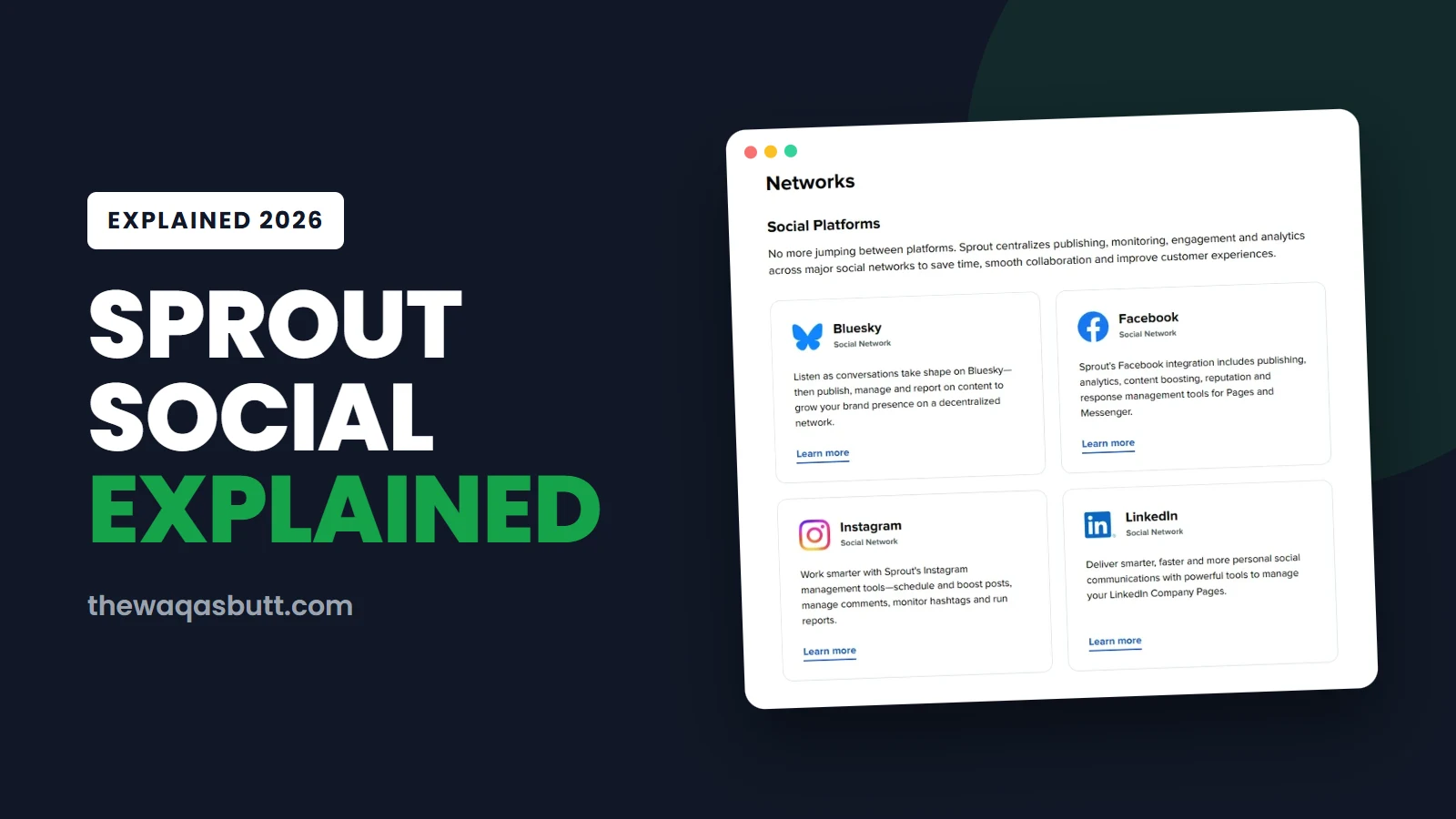
Sprout’s integrations page lists these social networks: Bluesky, Facebook, Instagram, LinkedIn, Pinterest, Reddit, Snapchat, Threads, TikTok, X and YouTube, plus Facebook Messenger and WhatsApp for messaging.
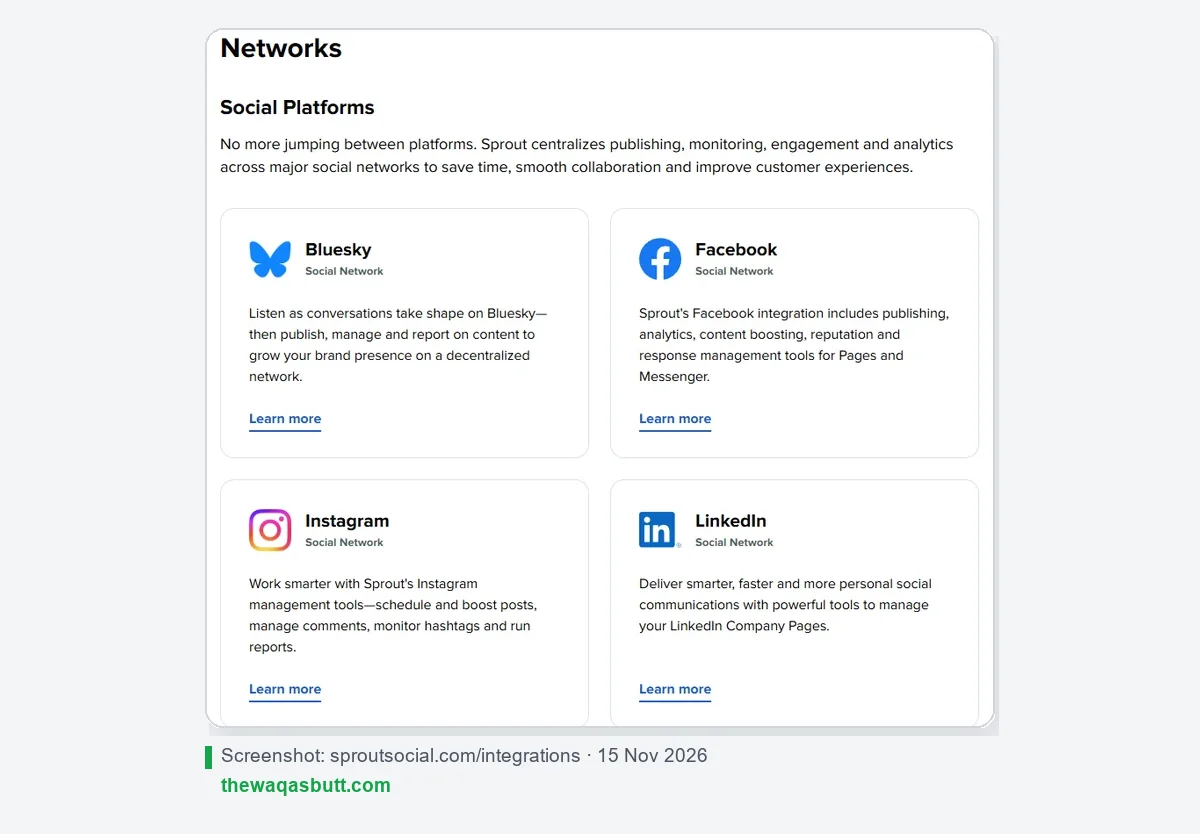
Review sites such as Google My Business, TripAdvisor, Glassdoor and Yelp can also be connected, and they count toward your profile limit, according to the pricing page.
Sprout Social pricing in 2026
Sprout Social charges per seat. A seat is one user, so a team of three pays three times the plan price.
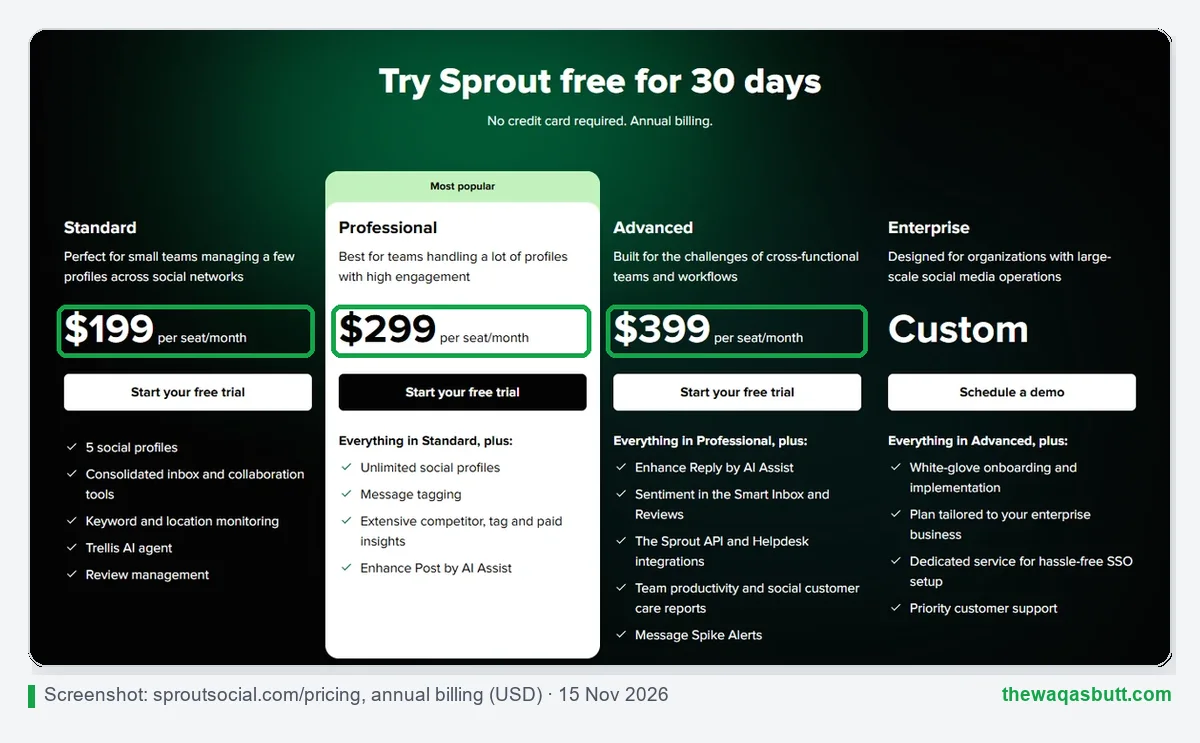
| Plan | Annual billing | Monthly billing | Profiles | Approvals |
|---|---|---|---|---|
| Essentials | $79 per seat/month | $99 per seat/month | 5 | No |
| Standard | $199 per seat/month | $249 per seat/month | 5 | No |
| Professional | $299 per seat/month | $399 per seat/month | Unlimited | Yes |
| Advanced | $399 per seat/month | $499 per seat/month | Unlimited | Yes (incl. external) |
| Enterprise | Custom | Custom | Unlimited | Yes |
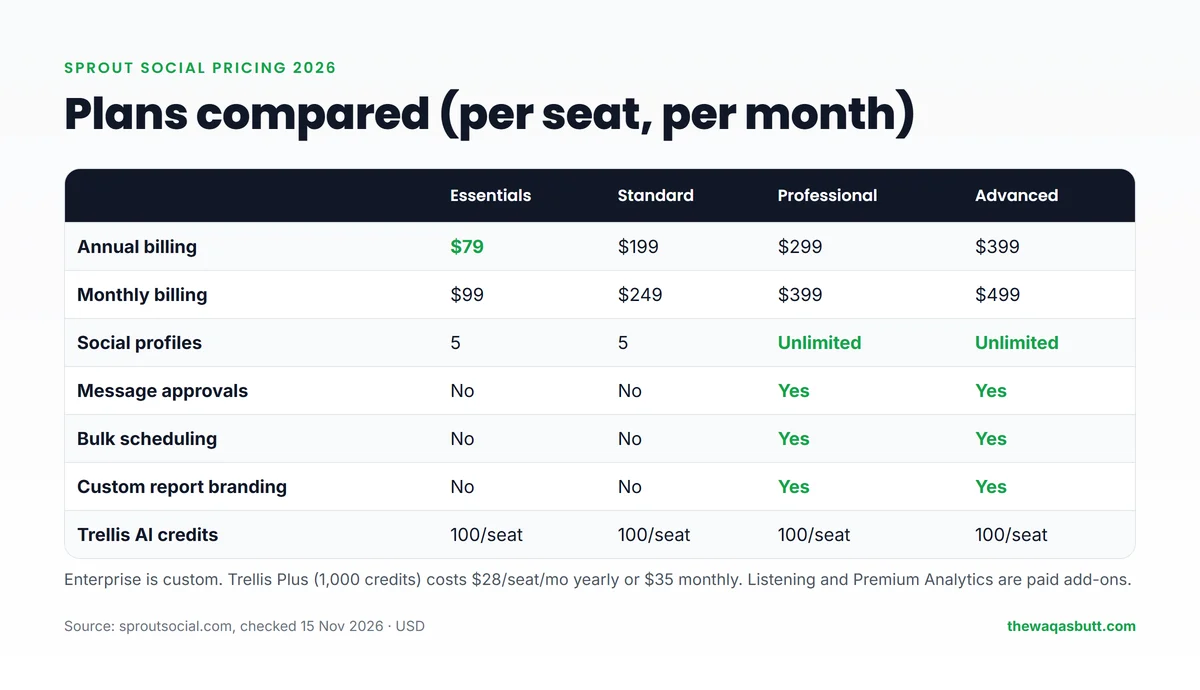
Notice the jump: Essentials and Standard both allow only 5 social profiles. If you manage more than five accounts, you need Professional at $299–$399 per seat.
Sprout offers nonprofit pricing on Professional and Advanced for US nonprofits. You can test any plan with the 30-day free trial.
Free trial and billing rules
- 30-day free trial, no credit card. When it ends, you pick a plan and enter payment details.
- No free plan. After the trial, you have to pay to keep using Sprout.
- Annual billing is paid upfront for the whole term. Sprout’s pricing FAQ says payment plans with several payments don’t get the same discount.
- You can switch plans at any time, even during the trial.
- Payment methods: major credit cards and PayPal.
Sprout’s pricing page doesn’t publish a refund policy, so read your order terms carefully before choosing annual billing.
Sprout Social pros and cons
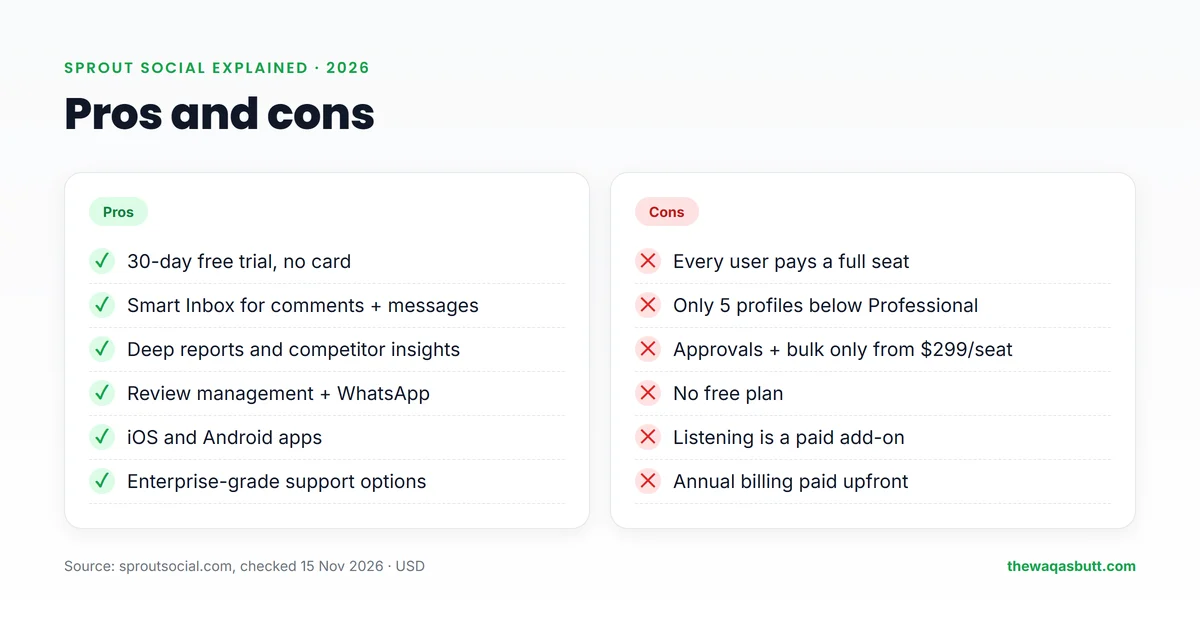
| Pros | Cons |
|---|---|
| 30-day free trial with no credit card | Every user pays a full seat |
| Smart Inbox with WhatsApp and Messenger | Only 5 profiles on Essentials and Standard |
| Deep reports and competitor insights (Professional+) | Approvals and bulk scheduling only from Professional |
| Review management and listening options | No free plan |
| iOS and Android apps on every plan | Listening and Premium Analytics cost extra |
| Enterprise onboarding and priority support | Annual billing is paid upfront |
Who Sprout Social is for (and who it’s not)
Sprout Social is a good fit if you…
- Run social for a mid-size or large brand with a real budget.
- Handle customer care on social, including WhatsApp, reviews and helpdesk tools.
- Need listening and competitor reports to show results to management.
- Want enterprise support and onboarding.
Look elsewhere if you…
- Are a freelancer or small agency paying out of your own pocket.
- Manage many client accounts with a small team, because profiles above 5 need Professional for every seat.
- Want a free plan to start with.
Sprout Social vs SkedCast: the better value for agencies
For agencies, the biggest difference isn’t a feature; it’s how you pay. Sprout charges per seat. SkedCast charges one flat price per plan, with a set number of accounts, clients and seats.
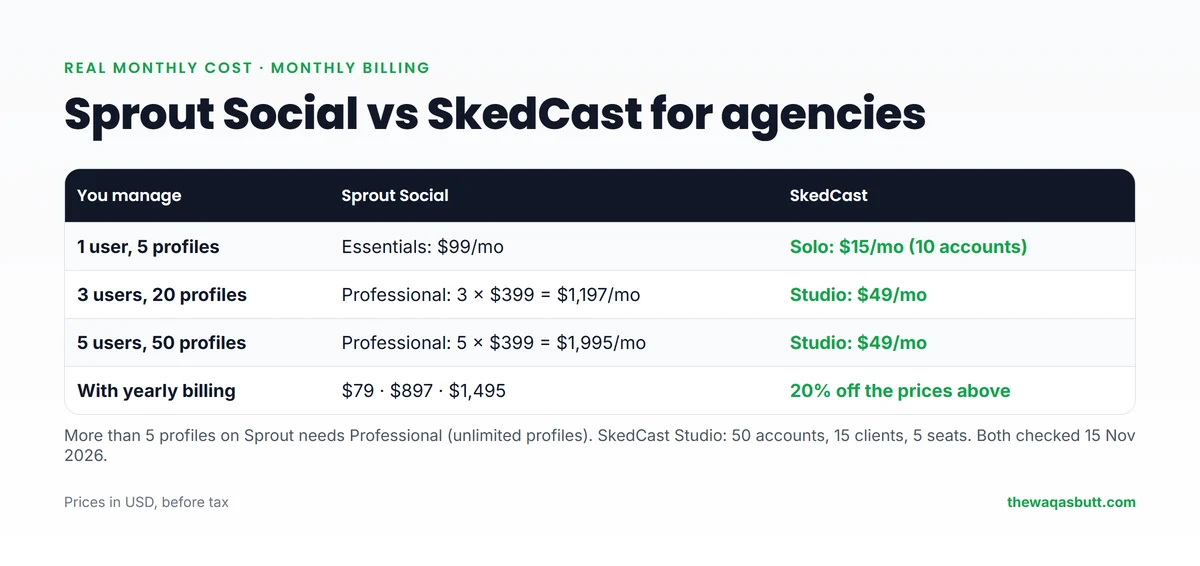
| You manage | Sprout Social (monthly billing) | SkedCast (monthly billing) |
|---|---|---|
| 1 user, 5 profiles | Essentials: $99/mo | Solo: $15/mo (10 accounts) |
| 3 users, 20 profiles | Professional: 3 × $399 = $1,197/mo | Studio: $49/mo (5 seats, 50 accounts) |
| 5 users, 50 profiles | Professional: 5 × $399 = $1,995/mo | Studio: $49/mo (5 seats, 50 accounts) |
With three people and 20 client profiles, that’s $1,197 vs $49 a month. Even on annual billing, Sprout Professional for three seats is $897 a month.
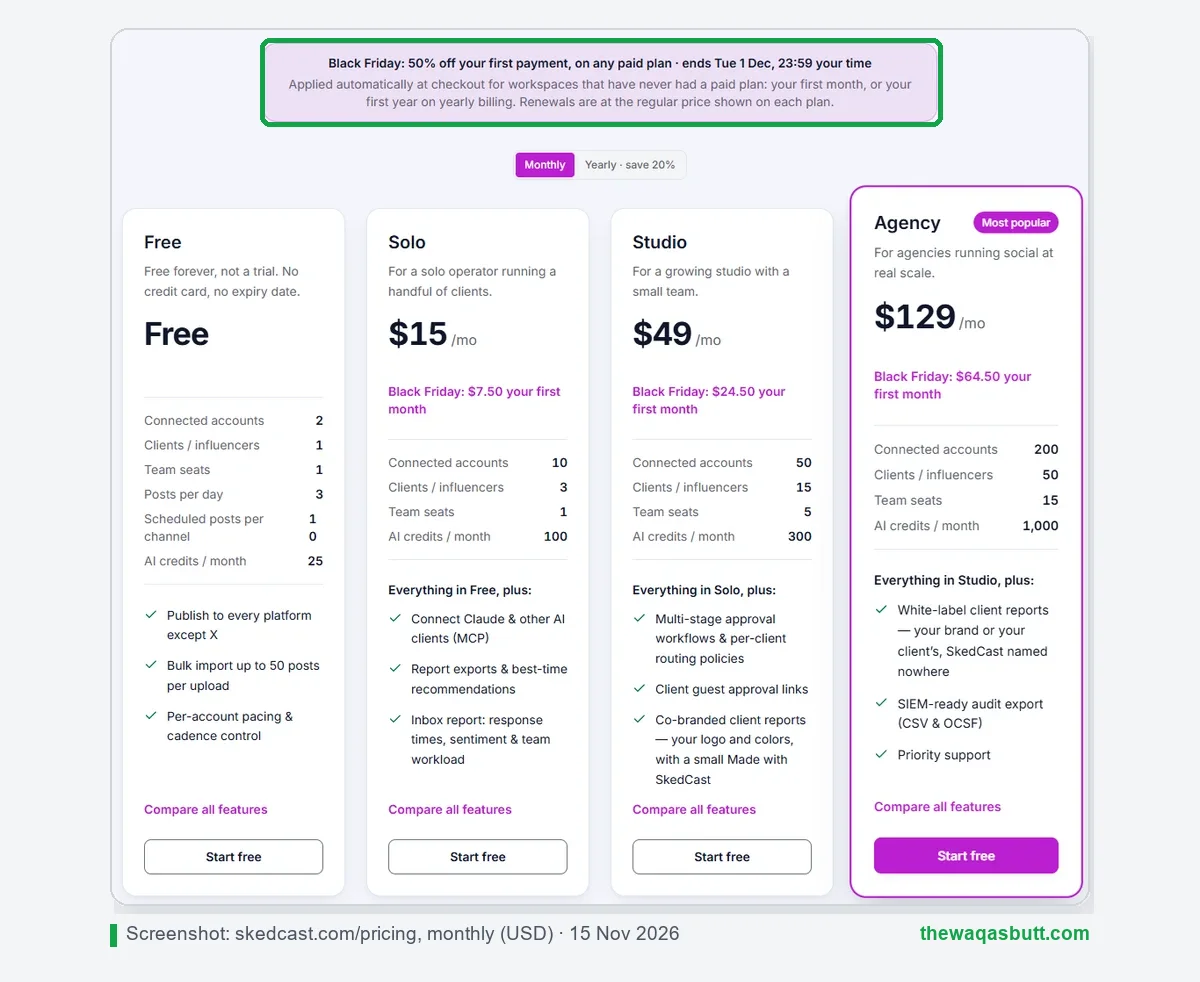
What SkedCast gives agencies
- Flat pricing: Studio covers 5 seats and 50 accounts for $49 a month; Agency covers 15 seats and 200 accounts for $129.
- Approvals and client guest links from Studio, and white-label reports from Agency.
- Bulk import from CSV, Google Sheets or AI, with per-account pacing and failure alerts.
- 11 platforms, including Telegram and Google Business Profile.
- A free forever plan and a 7-day Studio trial, both without a card.
Where Sprout Social still wins
- Customer care at scale: WhatsApp, review management, helpdesk integrations and sentiment.
- Listening and competitor insights for big brands.
- Mobile apps and enterprise onboarding; SkedCast is browser-only and new in 2026.
- Reddit and Snapchat publishing, which SkedCast doesn’t offer.
My take: if you’re a big brand with a customer care team, Sprout Social is worth a trial. If you’re a freelancer or agency managing client accounts, SkedCast does the publishing job for a small fraction of the cost. Read my full SkedCast review for its features, limits and refund policy.
My SkedCast link applies 40% off your first month automatically, and you get 20% to 40% off every month after that.
How to get the most from the 30-day trial
A trial only helps if you test the things you will really do every day. Here’s a simple plan that covers the important parts without taking over your calendar.
- Connect your real profiles on day one. Demo content hides problems. Real accounts show you how the tool behaves with your actual posts and followers.
- Test Smart Inbox replies. Answer a few real comments and messages from inside the tool. Check whether the inbox feels faster than switching between apps.
- Schedule a full week of posts. Build a calendar the way you would for a client. Notice how long it takes, and how clear the approval and scheduling steps are.
- Build one report. Create the kind of report you would send to a client or manager, and see whether it is something you would be happy to share.
- Invite only the teammates you would really pay for. Every invited person is a seat you might be billed for, so don’t add people just to test.
- Set a reminder before the trial ends. Put it in your calendar a few days ahead, so you can decide calmly instead of being rushed into a plan.
- Calculate your real per-seat total. Multiply the plan price by the number of people who will use it, then compare annual and monthly billing before you choose.
At the end of the trial, ask yourself one question: would you miss this tool if it disappeared tomorrow? If the honest answer is no, don’t pay for it.
It also helps to write down what you want to learn before you start, for example whether it saves you time or whether your team will actually use it. Notes made during the trial are far more reliable than your memory a month later.
What other Sprout Social guides get wrong
I read 10 Sprout Social guides that rank in the US. Here’s what to watch for.
- Most are written by competitors. Many pricing articles come from rival tools that end by selling their own product.
- Annual and monthly prices mixed up. Some list $249, $399 and $499 as annual prices. Those are Sprout’s monthly prices; annual is $199, $299 and $399.
- Essentials is missing. Older guides start at Standard and miss the $79 Essentials plan.
- Old prices. At least one still shows a $149 Professional plan from older pricing.
- The 5-profile limit is skipped. Few explain that you need Professional for more than 5 profiles, which changes the real cost for agencies.
- Networks aren’t listed. Almost none mention Bluesky, Reddit or Snapchat support.
I’ve told you openly that I earn from my SkedCast and Sprout Social links, and every price here comes from the official pages.
Practical tips before you start
- Prices are in US dollars, per user. A three-person team on Sprout Professional costs more per month than many small agencies charge a client.
- Use the 30-day trial wisely. Connect your real client accounts on day one so you can judge it properly.
- If you’re outside the US, pay with a card that allows international payments, or PayPal, which Sprout accepts.
- Start small. SkedCast’s free plan or Solo ($15) lets you manage clients before you invest in a big suite.
- WhatsApp-heavy clients? Sprout’s Smart Inbox handles WhatsApp messages, which can matter for local businesses.
Final thoughts
Sprout Social is a polished, powerful suite, especially for customer care, listening and reporting. For established brands with a budget, it’s one of the strongest options.
But per-seat pricing and the 5-profile limit below Professional make it expensive for freelancers and agencies. For publishing to many client accounts, SkedCast gives you approvals, bulk scheduling and 50 accounts for $49 a month.
My SkedCast link applies 40% off your first month automatically, and you get 20% to 40% off every month after that.
Want more honest tool guides? Read my Buffer guide, browse the resources page or join the newsletter.
FAQ
What is Sprout Social used for?
Sprout Social is used to schedule posts, reply to comments and messages, run reports, monitor reviews and listen to social conversations across networks like Instagram, Facebook, LinkedIn, TikTok and YouTube.
How much does Sprout Social cost in 2026?
Per seat per month: Essentials $79, Standard $199, Professional $299 and Advanced $399 on annual billing, or $99, $249, $399 and $499 on monthly billing. Enterprise is custom.
Does Sprout Social have a free plan?
No. Sprout Social has a 30-day free trial with no credit card, but no free plan. After the trial, you pick a paid plan.
How many social profiles does Sprout Social allow?
Essentials and Standard allow 5 social profiles. Professional, Advanced and Enterprise allow unlimited profiles. Review sites like Google My Business and Yelp count toward the limit.
Is Sprout Social worth it for small businesses?
It can be for a small business with one or two users and up to 5 profiles on Essentials. For agencies with many client accounts, per-seat pricing gets expensive quickly.
What is the best Sprout Social alternative for agencies?
For agencies managing many accounts, SkedCast is a strong lower-cost alternative because it charges a flat price per plan: Studio covers 5 seats and 50 accounts for $49 a month.
Does Sprout Social have AI features?
Yes. Every seat includes 100 Trellis AI credits a month, and AI Assist features like alt text and post enhancement. Trellis Plus adds 1,000 credits for $28 per seat a month on annual billing.
Can I pay for Sprout Social monthly?
Yes. Monthly billing costs more per seat ($99 to $499) than annual billing, which is paid upfront for the whole term.