Disclosure: This article contains affiliate links. If you buy through them, I may earn a commission at no extra cost to you. I only recommend tools I’ve researched carefully, and my opinions are my own. Read the full disclaimer.
If you manage several social media, ad or seller accounts from one computer, websites can link them through your browser fingerprint. One flagged account can then put the others at risk.
An antidetect browser gives every account its own browser profile. The problem for beginners is the price: most good tools cost $9 to $11 a month before you get more than a handful of profiles.
ixBrowser takes a different approach. Its free plan includes 100 browser profiles, and paid plans start at $3.99 a month.
In this ixBrowser review, I’ll explain what you really get for free, where the limits are, the refund rule you should know before paying, and who should choose something else.
Quick verdict
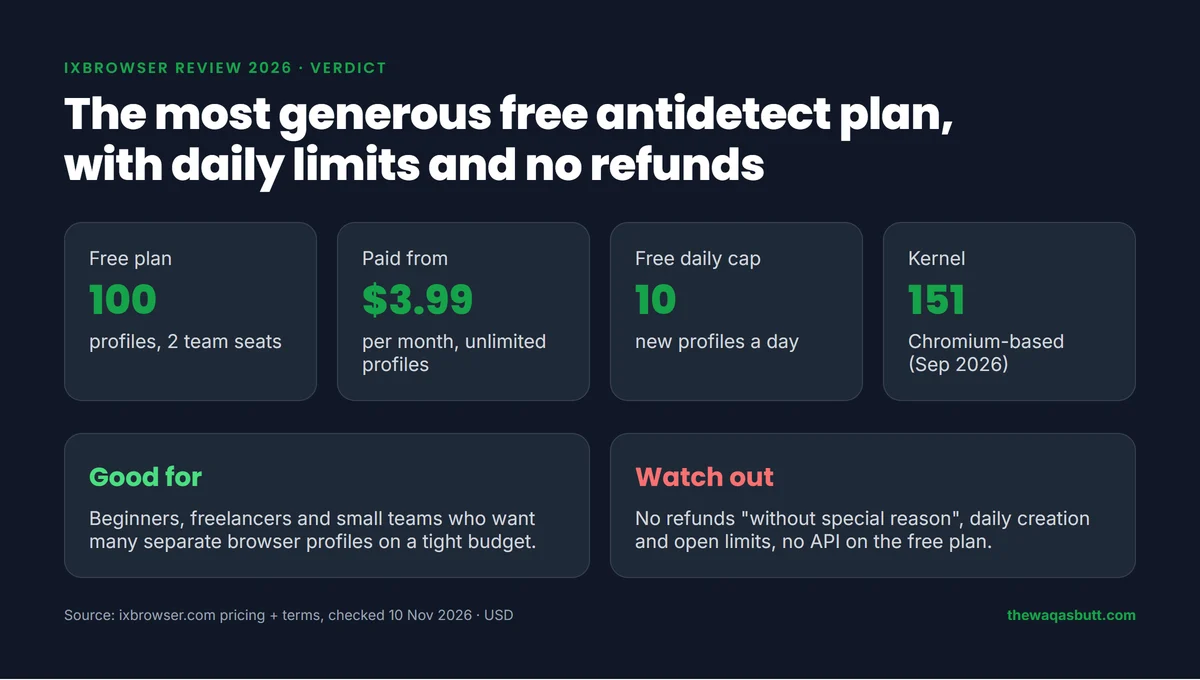
- What it is: a Chromium-based antidetect browser for managing many accounts in separate profiles.
- Best for: beginners, freelancers and small teams who want many profiles on a small budget.
- Not for: people who need a refund window, Linux, built-in proxy traffic or support from a known company.
- Free plan: 100 profiles and 2 team seats, with limits of 10 new profiles and 100 profile opens a day.
- Paid plans: $3.99, $9.99 and $19.99 a month, plus a $9.99 a year developer plan.
There is no promo code for this review. The prices below are ixBrowser’s normal prices.
In this review
- What is ixBrowser?
- How I researched this review
- Key features
- ixBrowser pricing in 2026
- Is ixBrowser really free?
- Free trial, refunds and payments
- Is ixBrowser safe?
- How to get started
- Pros and cons
- Who ixBrowser is for (and who it’s not)
- ixBrowser vs GoLogin vs Multilogin
- What other ixBrowser reviews get wrong
- Final verdict
- FAQ
What is ixBrowser?
ixBrowser is an antidetect browser. It lets you create many browser profiles, and each one has its own fingerprint, cookies and proxy.
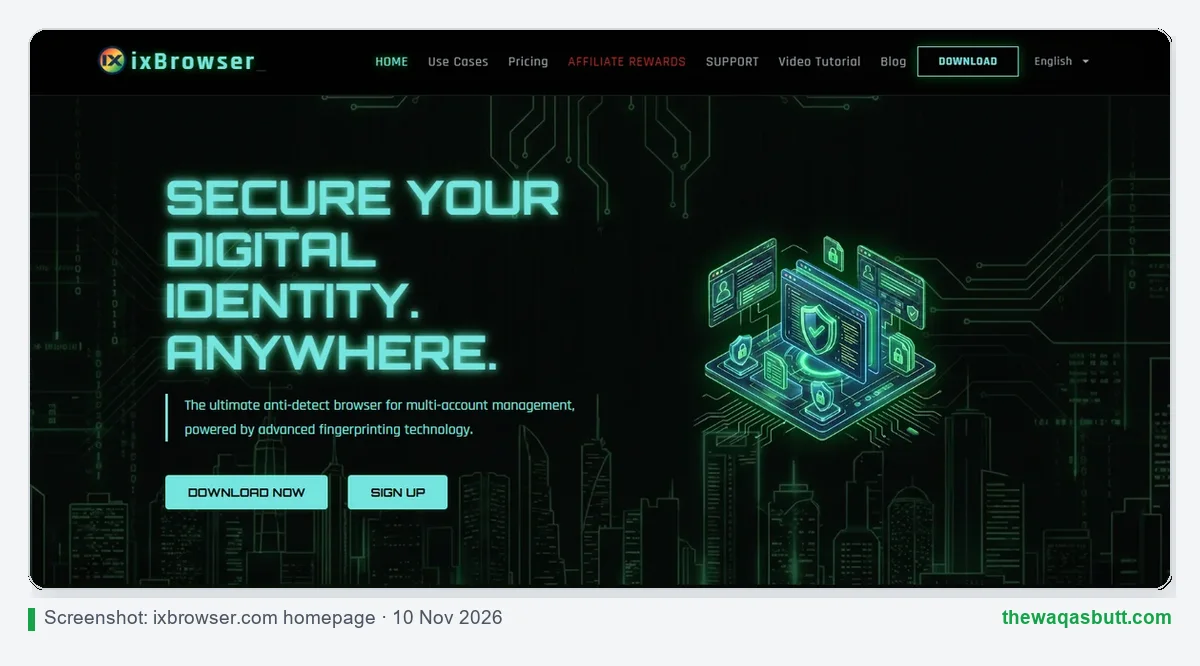
To a website, each profile looks like a different computer in a different place. That’s why people use it for social media management, ad accounts, e-commerce stores and affiliate work.
Its main selling point is price. The site calls it a “forever free” antidetect browser, and its homepage says the free version meets the needs of over 95% of users.
If you’re new to this kind of tool, my Multilogin review explains how antidetect browsers work in more detail.
How I researched this review
Here is exactly how I made this review, so you can judge it fairly.
- Official sources: I read ixBrowser’s pricing page, homepage, download page, update logs, user agreement and its “free and safe” article, all checked on 10 November 2026.
- Exact prices: every price comes from ixBrowser’s own pricing table in USD, with a dated screenshot.
- Competitor reviews: I read the ixBrowser reviews ranking in the US. Most are written by rival browser makers or proxy companies, which I point out below.
- What I didn’t do: I haven’t run my own ban or fingerprint tests for this review, so I don’t invent pass rates or ban numbers.
Key features
These are the features that matter most for everyday multi-account work, based on ixBrowser’s own pages.
Browser profiles with custom fingerprints
Each profile gets its own digital fingerprint, and you can customize each parameter or reset it. Every plan, including Free, includes Advanced Fingerprint Control, batch import and profile transfer.
ixBrowser says its profiles get a “high pass rate” on third-party fingerprint test sites. That’s the company’s claim. I haven’t tested it myself, so treat it as a promise to check, not a result.
A frequently updated Chromium kernel
An antidetect browser is only as good as its browser engine. If the engine is old, websites can spot it.
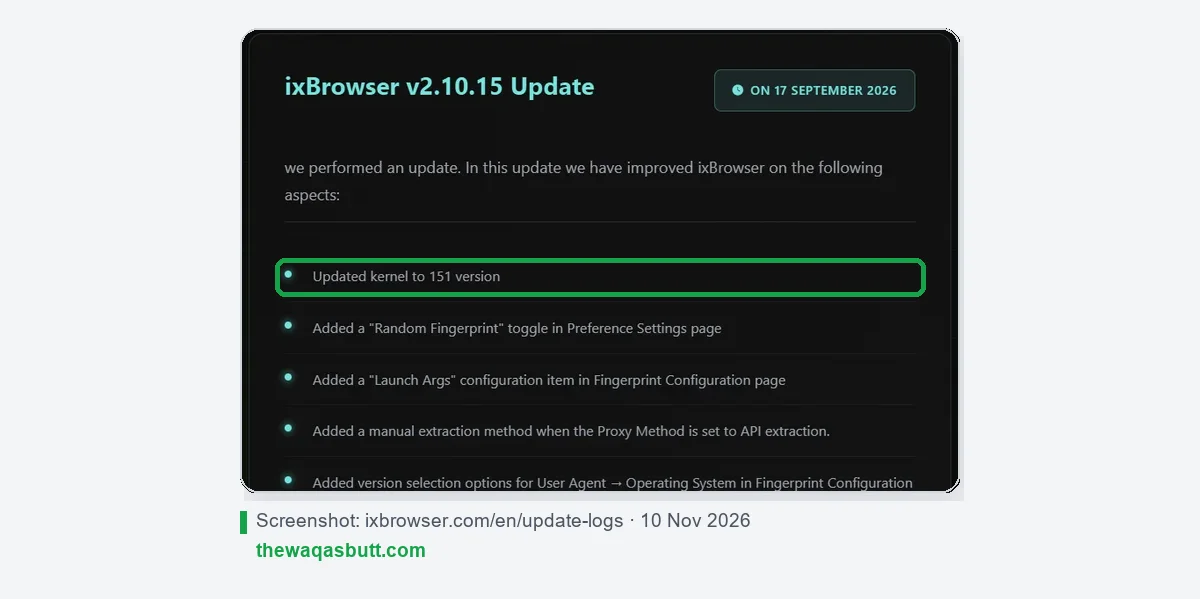
ixBrowser’s update log shows regular updates. Version 2.10.15 (17 September 2026) moved to kernel 151, after earlier updates to kernels 145 and 148. The latest Windows version is 2.10.18, released on 24 September 2026.
Recent updates also added a Random Fingerprint toggle, a Passkey Manager and an option to switch on automatic kernel updates.
Team management
You can add sub-accounts and set member permissions. For example, a tutorial shows how to stop team members from adding or deleting extensions.
- Free: 2 team seats.
- Professional: 20 seats. Business: 50. Enterprise: 150.
API, Synchronizer and batch tools
For bigger workloads, ixBrowser offers a local API for automation scripts and a Synchronizer that repeats your actions across several profile windows. Both need a paid plan; they’re not included in Free.
All plans can import, export and edit cookies, and create, copy, edit and open profiles in bulk.
Extensions and cloud storage
You can add Chrome extensions, including your own uploaded extensions. Paid plans add advanced cloud storage for profile data; the Free plan doesn’t include it.
Windows and macOS
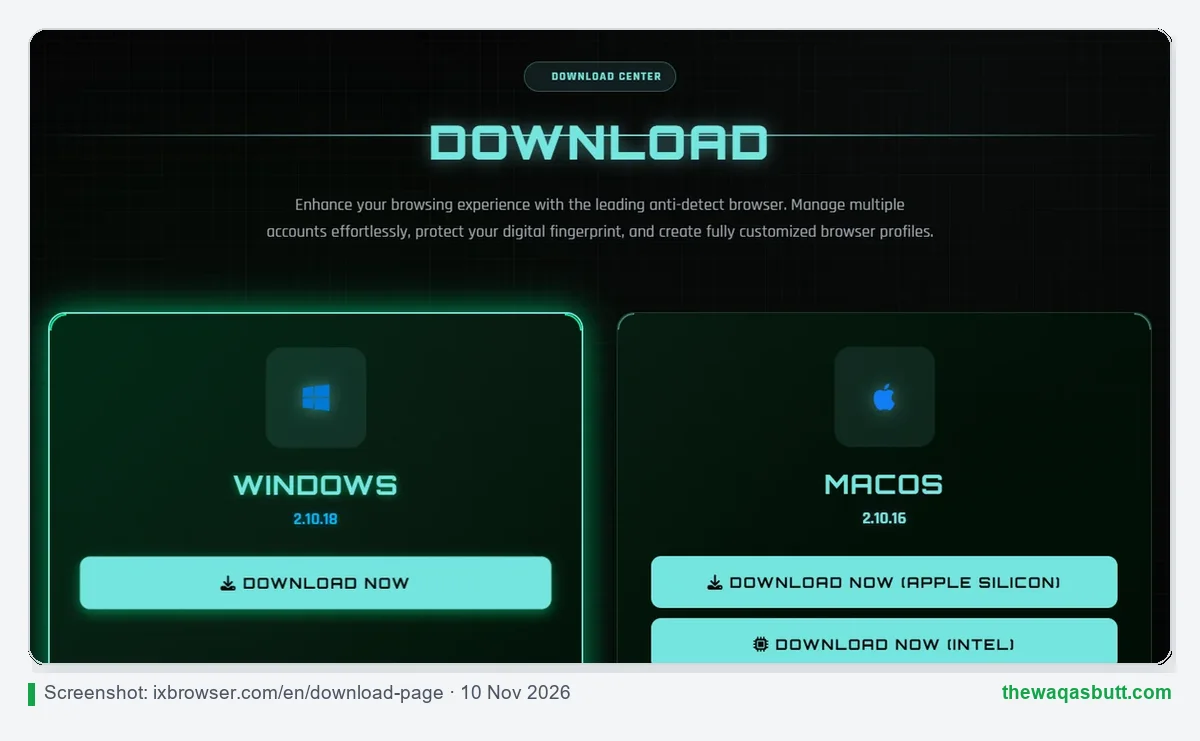
The download page offers apps for Windows and macOS, with separate builds for Apple Silicon and Intel Macs. There is no Linux version and no mobile app.
Proxies: bring your own
ixBrowser doesn’t include proxy traffic in its plans. You add a proxy to each profile yourself. Its video tutorials also show that you can buy static proxies inside the app, but the prices are only shown in the client.
If you want your own provider, I reviewed Proxy-Seller, which sells static ISP and residential proxies. My code WAQAS gives 15% off IPv4, IPv6, ISP and residential proxies there.
ixBrowser pricing in 2026
ixBrowser has five plans. Here is its official pricing table in USD.
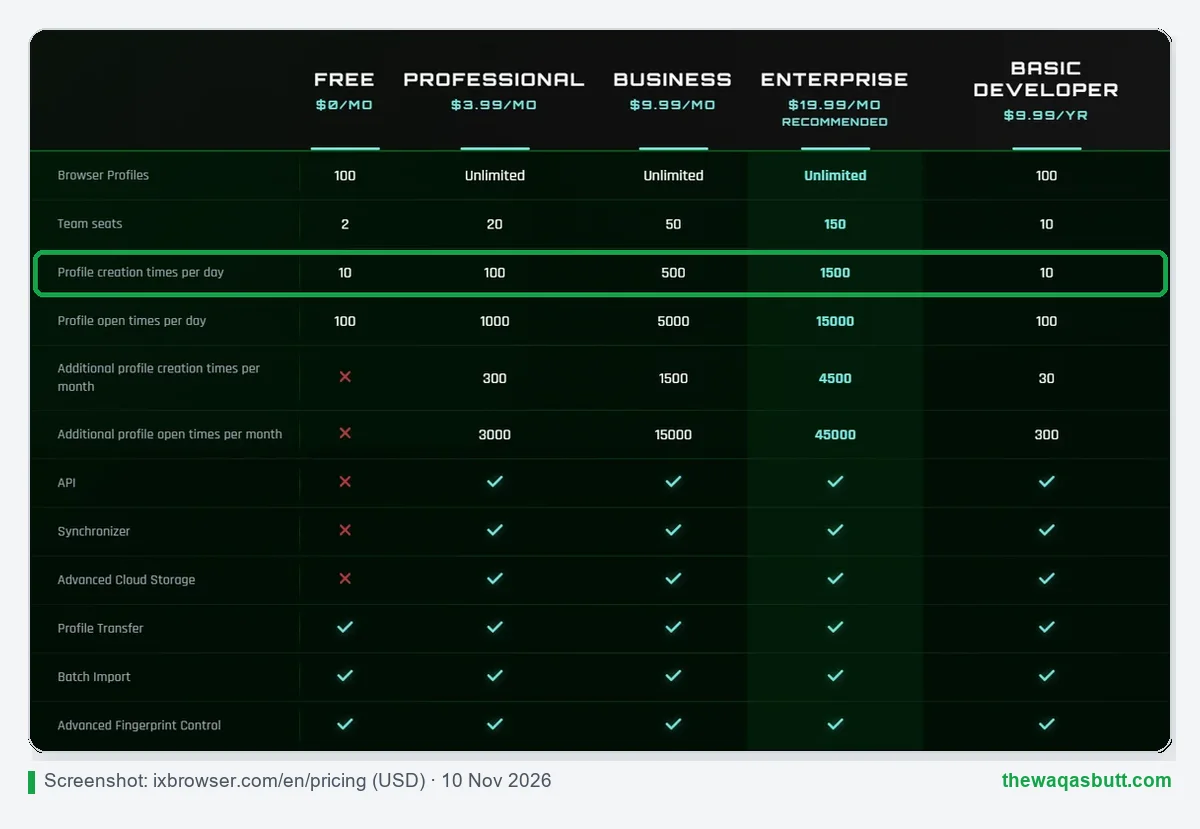
| Plan | Price | Profiles | Team seats | New profiles / day | Profile opens / day |
|---|---|---|---|---|---|
| Free | $0 | 100 | 2 | 10 | 100 |
| Professional | $3.99/month | Unlimited | 20 | 100 | 1,000 |
| Business | $9.99/month | Unlimited | 50 | 500 | 5,000 |
| Enterprise | $19.99/month | Unlimited | 150 | 1,500 | 15,000 |
| Basic Developer | $9.99/year | 100 | 10 | 10 | 100 |
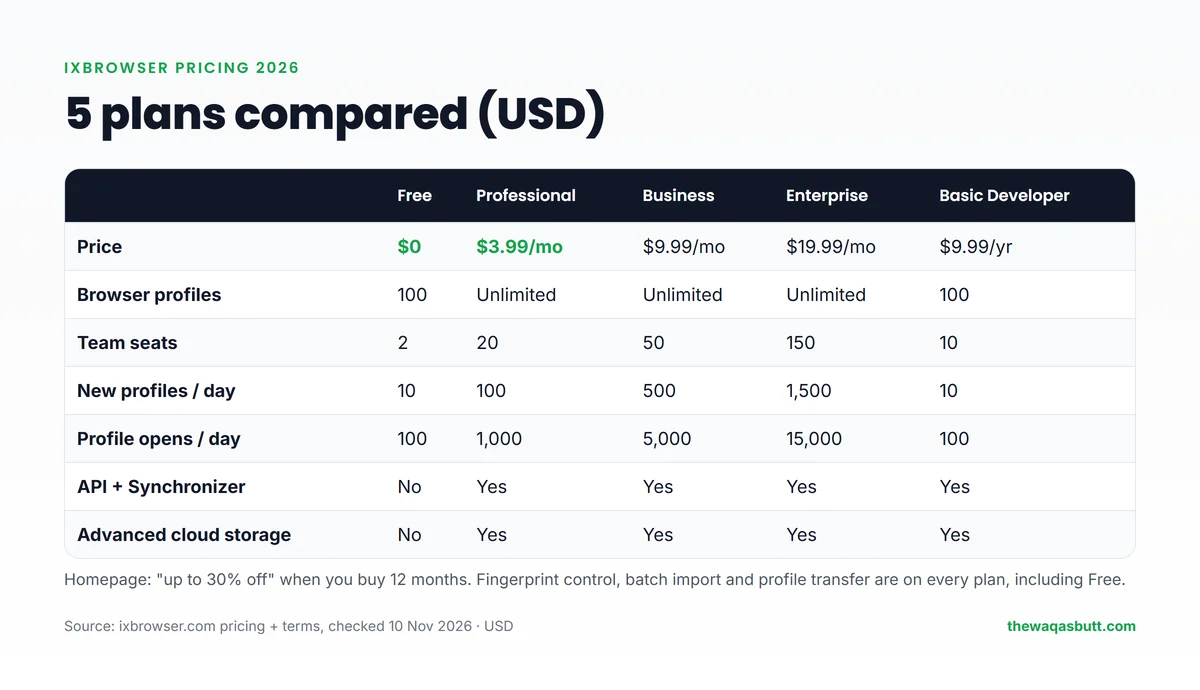
Three details are easy to miss:
- “Unlimited” has daily limits. Paid plans have no cap on total profiles, but they do cap how many you create and open each day. Paid plans also include extra monthly allowances, such as 300 extra creations and 3,000 extra opens on Professional.
- API and Synchronizer are paid features. Free has neither. The cheapest way to get the API is Basic Developer at $9.99 a year, which keeps the Free plan’s profile limits.
- Yearly discount: the homepage says you get up to 30% off when you buy 12 months. The pricing table itself doesn’t show yearly prices, so check the final price in the app before paying.

Is ixBrowser really free?
Yes, and it’s the most generous free plan I’ve seen among the antidetect browsers I’ve reviewed. GoLogin’s free plan has 3 profiles and Multilogin’s has 5. ixBrowser’s has 100.
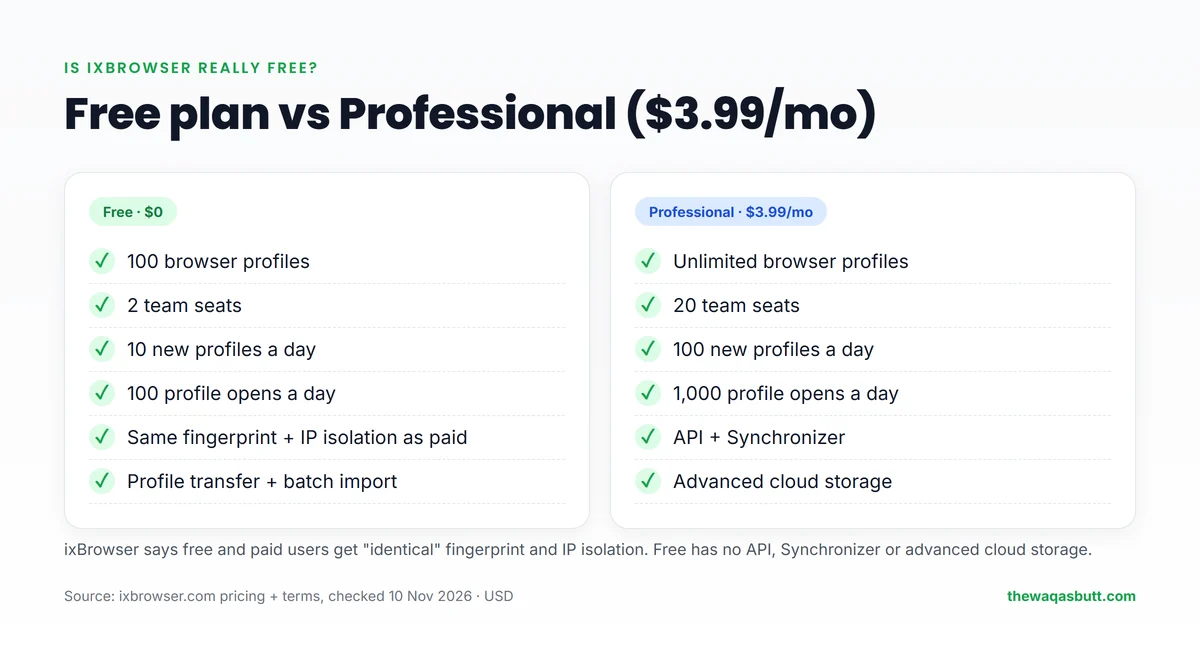
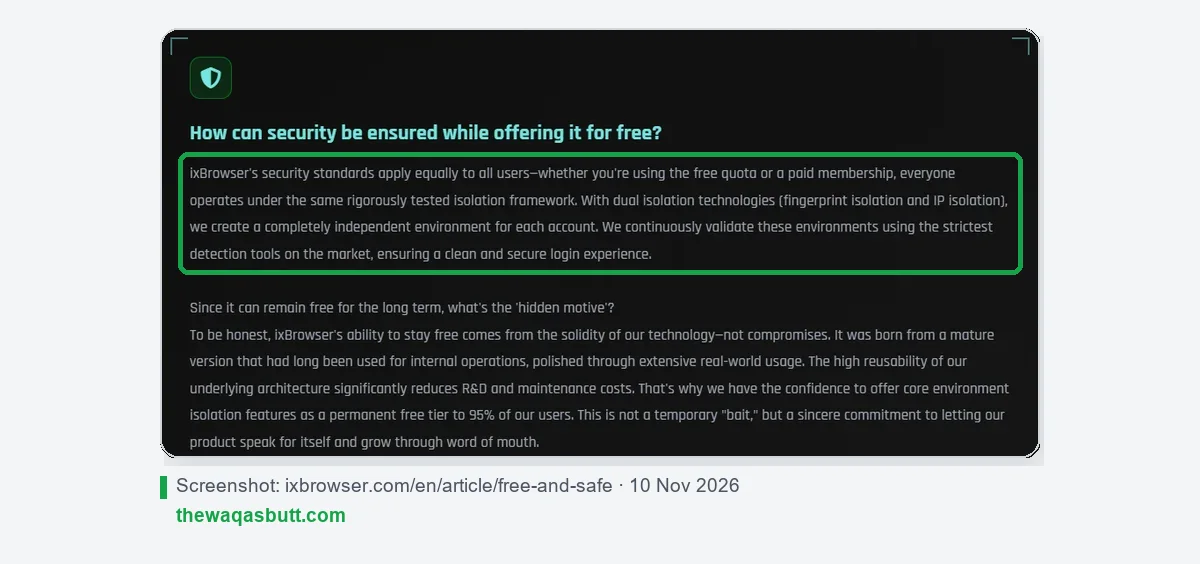
ixBrowser also says free users get the same protection as paying users. Its “free and safe” page says security standards “apply equally to all users”.
The limits show up when you scale. On Free you can create 10 new profiles a day and open profiles 100 times a day, with only 2 team seats and no API. For one person with a few dozen accounts, that’s often enough.
One small inconsistency: the homepage says the free version covers “over 95% of users” in one place and “99% of users” in another. Either way, the message is that most solo users won’t need to pay.
Free trial, refunds and payments
Is there a free trial?
ixBrowser’s user agreement says every new user gets a free trial to test the app, and that trial orders are manually reviewed and approved. It doesn’t say how long the trial lasts. Because the Free plan is permanent, most people can simply test on Free first.
Can you get a refund?
Usually not. This is the most important warning in this review.
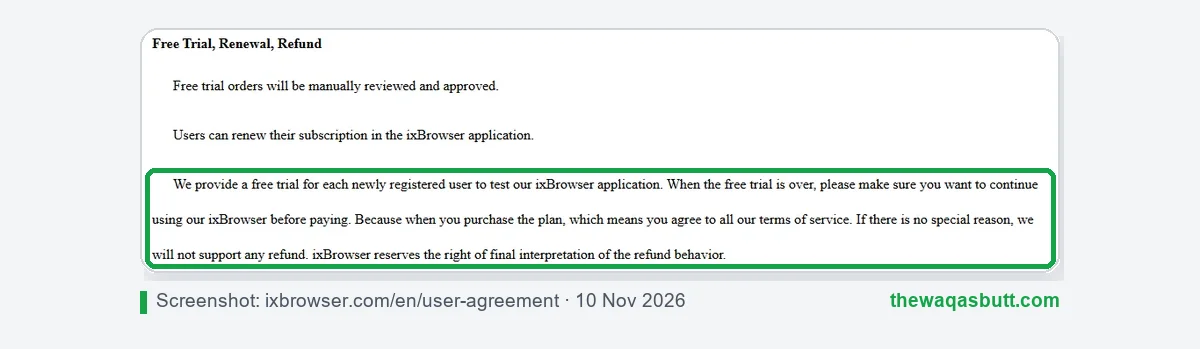
The user agreement says that without a special reason, ixBrowser won’t give refunds, and that it has the final say on refunds. It doesn’t explain what counts as a special reason.
So use the Free plan until you’re sure, then start with one month before buying a year.
Payment methods
The user agreement lists PayPal, Alipay and WeChat, plus other online or local payment methods in some countries. You renew your subscription inside the ixBrowser app.
Is ixBrowser safe?
There are two different questions here: is the software safe to install, and will your accounts be safe?
- The software: download it only from ixbrowser.com. Fake download sites with similar names are a risk for any popular tool, so check the address before you install anything.
- Your data: ixBrowser says it earns money only from subscriptions, not from selling data. Its terms also say you should back up your own data, and that it isn’t obliged to provide backups.
- Your accounts: no antidetect browser can guarantee an account won’t be banned. Use one clean proxy per profile, and follow each platform’s rules.
One more thing to know: I couldn’t find a company name, country or address on ixBrowser’s site. Its terms only say “ixBrowser”, list a support email on the ixspy.com domain, and were last updated in November 2022. That’s not a red flag on its own, but it’s less transparent than bigger tools.
How to get started
- Download ixBrowser for Windows or macOS from the official site, and sign up.
- Get a proxy for each account. A static ISP or residential proxy suits long-lived social media accounts.
- Create a profile, add its proxy, and keep the fingerprint settings that match the proxy’s location.
- Log in to one account per profile, and never mix accounts between profiles.
- Watch your daily limits: on Free, you can create 10 new profiles a day.
- Upgrade to Professional only when you need more daily capacity, more seats, the API or the Synchronizer.
Pros and cons
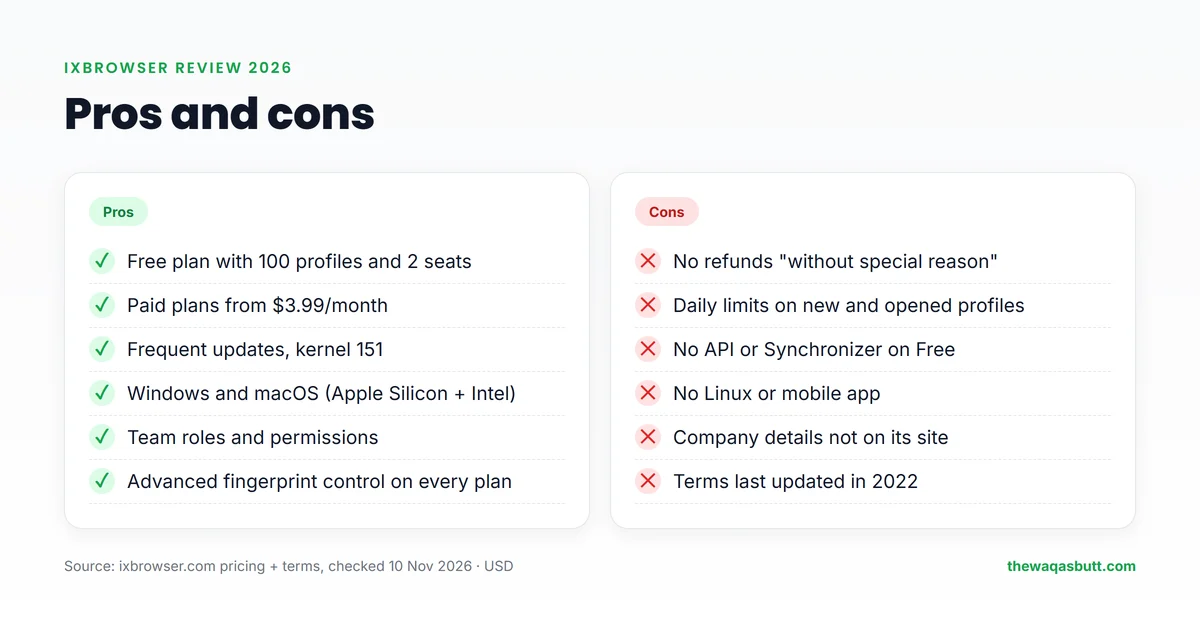
Pros
- Free plan with 100 profiles and 2 team seats.
- Paid plans from $3.99 a month, with unlimited profiles.
- Advanced fingerprint control on every plan.
- Frequent updates, with kernel 151 since September 2026.
- Windows and macOS apps for Apple Silicon and Intel.
- Team seats with member permissions.
Cons
- No refunds without a “special reason”.
- Daily limits on creating and opening profiles, even on paid plans.
- No API or Synchronizer on the Free plan.
- No Linux version and no mobile app.
- No proxy traffic included.
- No company details on the site, and terms from 2022.
Who ixBrowser is for (and who it’s not)
ixBrowser is a good fit if you:
- Are a beginner or freelancer who wants to try an antidetect browser without paying.
- Run social media, ad or e-commerce accounts and need many profiles on a small budget.
- Work in a small team that needs a few shared seats.
- Already have proxies, or are happy to buy one proxy per profile.
It’s probably not for you if you:
- Need a clear money-back guarantee before paying.
- Use Linux, or need mobile profiles and cloud phones.
- Want proxy traffic included in your plan.
- Run a large agency that needs a well-known company, contracts and dedicated support.
ixBrowser vs GoLogin vs Multilogin
These are the two alternatives my readers ask about most. Both cost more, but both come with clearer refund rules and built-in proxy traffic.
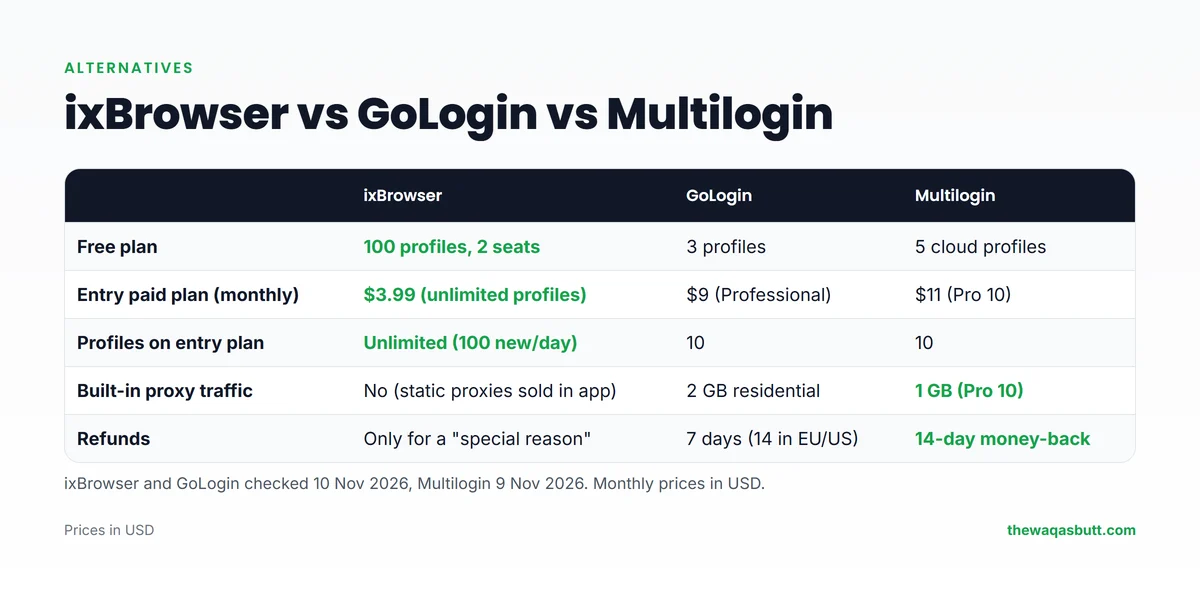
| ixBrowser | GoLogin | Multilogin | |
|---|---|---|---|
| Free plan | 100 profiles, 2 seats | 3 profiles | 5 cloud profiles |
| Entry paid plan (monthly) | $3.99 (unlimited profiles) | $9 (Professional) | $11 (Pro 10) |
| Built-in proxy traffic | No | 2 GB residential | 1 GB (Pro 10) |
| Refunds | Only for a “special reason” | 7 days (14 in the EU/US) | 14-day money-back |
- Choose ixBrowser if you want the most free profiles and the lowest paid price, and you can live without a refund window.
- Choose Multilogin if account safety and support matter more than price. Code Waqas50 gives 50% off your first payment. Read my Multilogin review.
- Choose GoLogin if you want a middle option with residential traffic and a 7-day refund window. Code WAQAS40 gives 40% off your first payment.
AdsPower is another popular option. When I checked its official site on 5 November 2026, its free plan had 2 profiles and its Professional plan was $9 a month.
What other ixBrowser reviews get wrong
When I read the ixBrowser reviews ranking in the US, a few problems kept coming up.
- Rival authors: most top results are written by competing antidetect browsers or proxy companies. Several end by recommending their own product, without an affiliate disclosure.
- Wrong prices: one review says paid plans start “around $49/month”. ixBrowser’s paid plans start at $3.99 a month.
- “Unlimited” free profiles: some reviews say the free plan has unlimited profiles. The pricing page says 100, with 10 new profiles a day.
- “Windows only”: one guide says ixBrowser only works on Windows. It also has macOS apps for Apple Silicon and Intel.
- Refunds: none of the reviews I read explains that ixBrowser usually doesn’t give refunds.
- Test claims without proof: some repeat that ixBrowser “passes 60+ fingerprint tests” without showing results, dates or versions.
That’s why every number in this review comes from ixBrowser’s own pages, with the date I checked them.
Final verdict
ixBrowser is the best-value antidetect browser for beginners in 2026. No other tool I’ve reviewed gives you 100 free profiles, and $3.99 a month is very cheap for unlimited profiles.
The trade-offs are real, though: daily limits, no API on Free, no proxy traffic, limited company information and a strict no-refund rule. Start on the Free plan, add good proxies, and upgrade only when the limits get in your way.
If it fits your work, you can download ixBrowser here. For more tools I use and recommend, see my resources page.
FAQ
Is ixBrowser free?
Yes. ixBrowser’s Free plan includes 100 browser profiles and 2 team seats, with limits of 10 new profiles and 100 profile opens a day. The API and Synchronizer need a paid plan.
How much does ixBrowser cost?
Professional costs $3.99 a month, Business $9.99 and Enterprise $19.99. Basic Developer costs $9.99 a year. The homepage says buying 12 months gives up to 30% off.
Does ixBrowser give refunds?
Usually not. Its user agreement says it won’t support refunds without a special reason, and that ixBrowser has the final say. Test on the Free plan before you pay.
Is ixBrowser safe to use?
Download it only from the official site, ixbrowser.com, to avoid fake copies. ixBrowser says free and paid users get the same fingerprint and IP isolation. No antidetect browser can guarantee accounts won’t be banned.
Does ixBrowser include proxies?
No proxy traffic is included in its plans. You add your own proxy to each profile, and ixBrowser’s tutorials show you can also buy static proxies inside the app.
Does ixBrowser work on Mac?
Yes. ixBrowser has apps for Windows and macOS, with separate builds for Apple Silicon and Intel Macs. There is no Linux version.
Is ixBrowser better than GoLogin?
ixBrowser is cheaper and has a much bigger free plan. GoLogin costs more but includes residential proxy traffic and a 7-day refund window, or 14 days in the EU and US.
Want more honest reviews and step-by-step guides for earning online? Join my newsletter.