
Disclosure: This article contains affiliate links. If you buy through them, I may earn a commission at no extra cost to you. I only recommend tools I’ve researched carefully, and my opinions are my own. Read the full disclaimer.
If you want to start a blog, a portfolio or an online store, you’ll hear two words again and again: domain name and web hosting. Many beginners think they’re the same thing, or buy one and forget the other.
They’re two different services that work as a team. One is your website’s name, and the other is the place where your website lives.
In this guide, I’ll explain both in plain English, show how they connect, what they really cost in 2026, and the renewal trap most beginners miss.
Quick answer
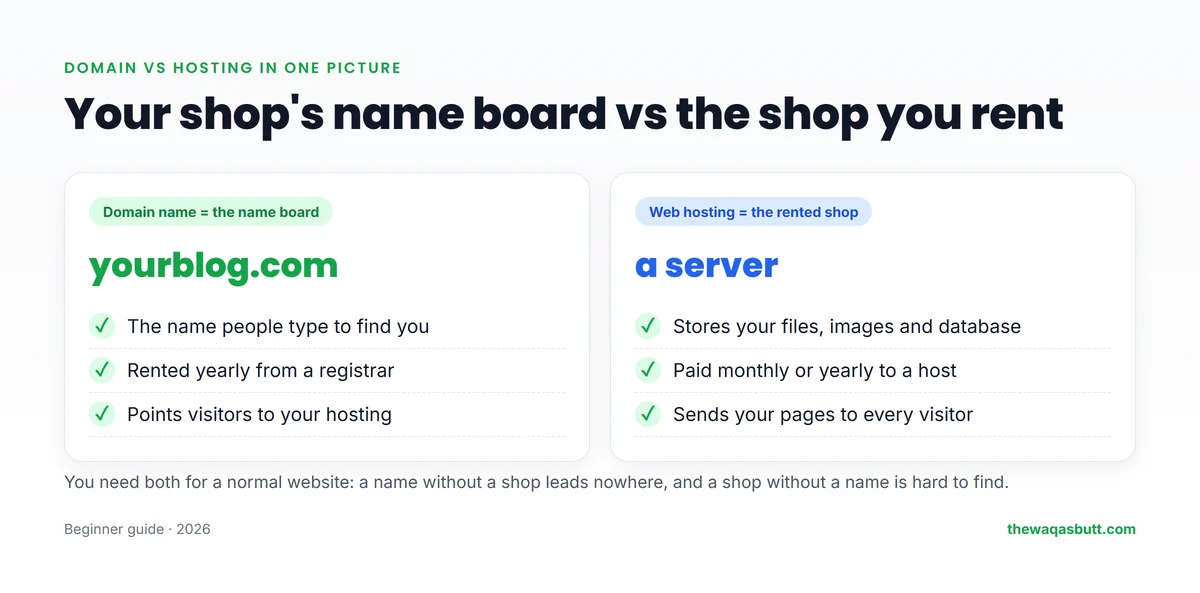
- Domain name: your website’s address, like thewaqasbutt.com. You rent it yearly from a domain registrar.
- Web hosting: space on a server where your website’s files live. You pay a hosting company monthly or for a few years.
- Together: the domain points visitors to your hosting, and the hosting sends them your website.
- Do you need both? For a normal self-hosted website or WordPress blog, yes.
If you’re starting your first website, Hostinger sells both, and its hosting plans include a free domain for the first year. Use code SK20 at checkout.
In this guide
- What is a domain name?
- What is web hosting?
- How domain names and hosting work together
- Domain vs hosting: the key differences
- Types of web hosting
- How much do a domain and hosting cost?
- Should you buy both from the same company?
- How to connect a domain to hosting
- Practical tips before you start
- Common beginner mistakes
- Domain and hosting mistakes that are easy to avoid
- How I researched this guide
- Final thoughts
- FAQ
What is a domain name?
A domain name is the address people type to reach your website, such as google.com or thewaqasbutt.com.
Behind the scenes, every website lives on a server with a number called an IP address, like 192.0.2.10. Nobody wants to remember numbers, so domain names give websites easy, human names.
Parts of a domain name
- Name: the part you choose, such as “thewaqasbutt”.
- Extension (TLD): the ending, such as .com, .net, .org or a country ending like .uk or .de.
A .com is still the safest choice for most blogs, because people type it by habit. Country endings work well if your audience is mostly in one country.
Who controls domain names?
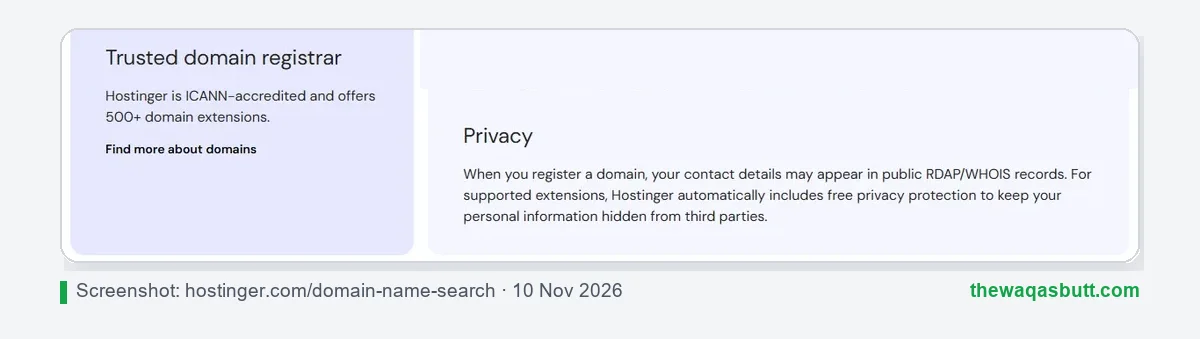
Domain names are managed worldwide by ICANN and the registries behind each extension. You buy a domain from a registrar, a company allowed to sell them.
You never really “own” a domain forever. You rent it, usually for 1 to 10 years, and must renew it to keep it.
When you register a domain, your contact details can appear in public WHOIS records. WHOIS privacy hides them. Hostinger, for example, says it adds free privacy protection for supported extensions.
What is web hosting?
Web hosting is a service that stores your website on a powerful computer called a server, which is online 24 hours a day.
Your website is made of files: text, images, code and a database. When someone visits, the server sends those files to their browser. Without hosting, there’s nothing to show.
A hosting plan usually includes:
- Storage for your files, such as 20 GB or 50 GB.
- Bandwidth and resources to serve visitors.
- Email accounts on your domain, such as you@yourblog.com, on many plans.
- A free SSL certificate, so your site loads with https and a padlock.
- One-click WordPress and a control panel to manage it all.
How domain names and hosting work together
Here’s the easiest way to picture it. Your domain name is the name board on a shop. Your hosting is the shop you rent, where all your products are kept.
A name board on an empty street leads nowhere. A shop without a name board is hard to find. You need both.
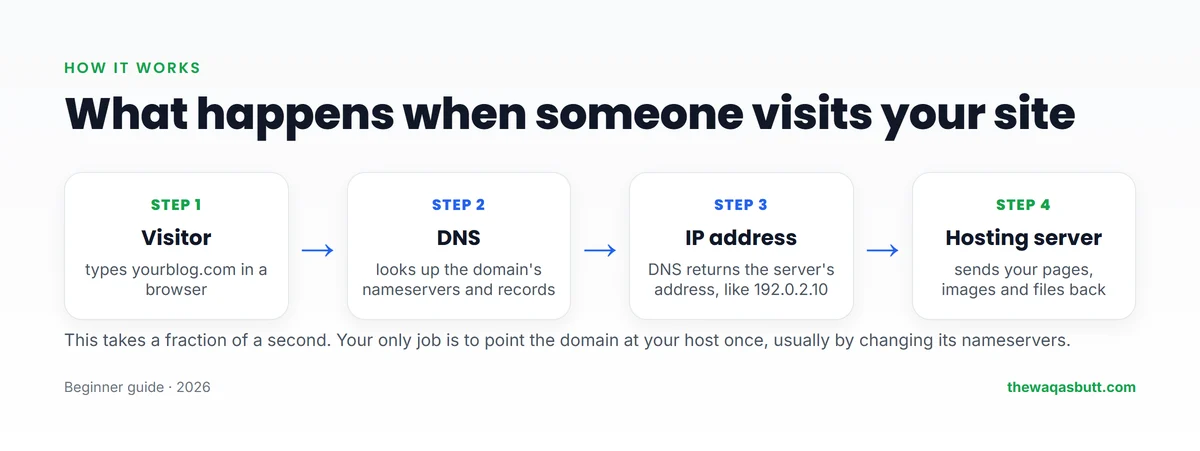
When someone types your domain, this is what happens in a fraction of a second:
- The browser asks the DNS (Domain Name System), the internet’s phone book, where your domain lives.
- DNS checks your domain’s nameservers, which point to your hosting company.
- The hosting company’s DNS returns your server’s IP address.
- The browser contacts that server, and your hosting sends your website back.
The only part you do yourself is pointing your domain to your host once. After that, it works automatically.
Domain vs hosting: the key differences
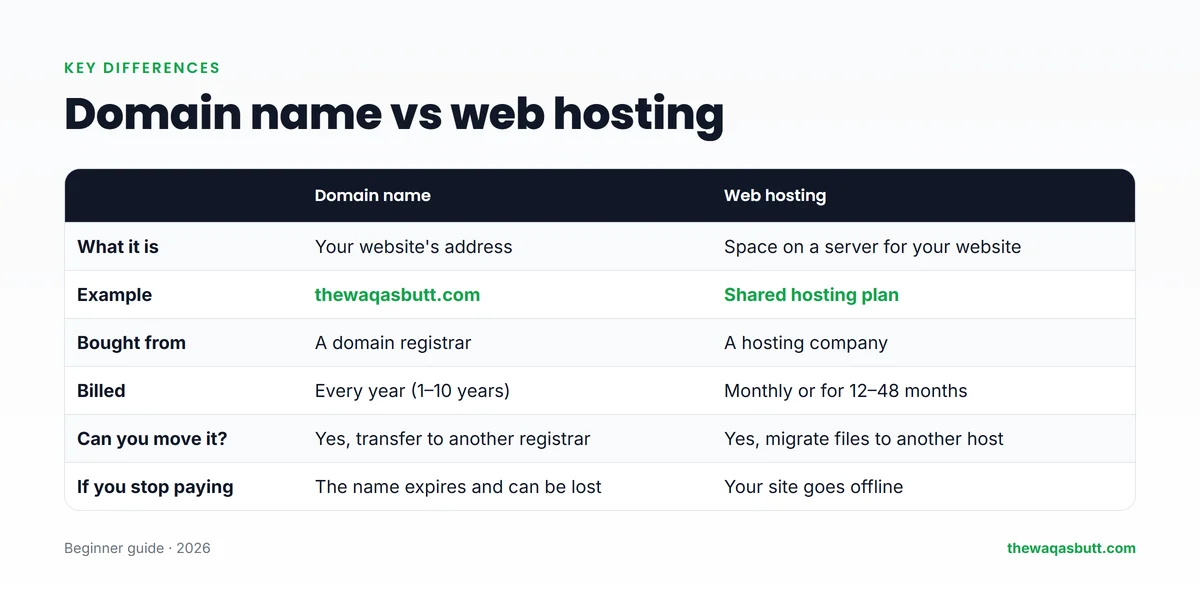
| Domain name | Web hosting | |
|---|---|---|
| What it is | Your website’s address | Space on a server for your site |
| Bought from | A domain registrar | A hosting company |
| Usually billed | Every year (1–10 years) | Monthly or for 12–48 months |
| Can you move it? | Yes, transfer it to another registrar | Yes, migrate your site to another host |
| If you stop paying | The name expires and someone else can register it | Your website goes offline |
Can you have a domain without hosting?
Yes. Many people buy a domain early to reserve a name before someone else takes it. Without hosting, though, the domain won’t show a website. You can also forward it to another site or use it only for email.
Can you have hosting without a domain?
Technically yes, but visitors would need your server’s IP address or a temporary address from your host. For a real website, you’ll want a domain.
Types of web hosting
Not all hosting is the same. Here are the main types, from cheapest to most powerful.
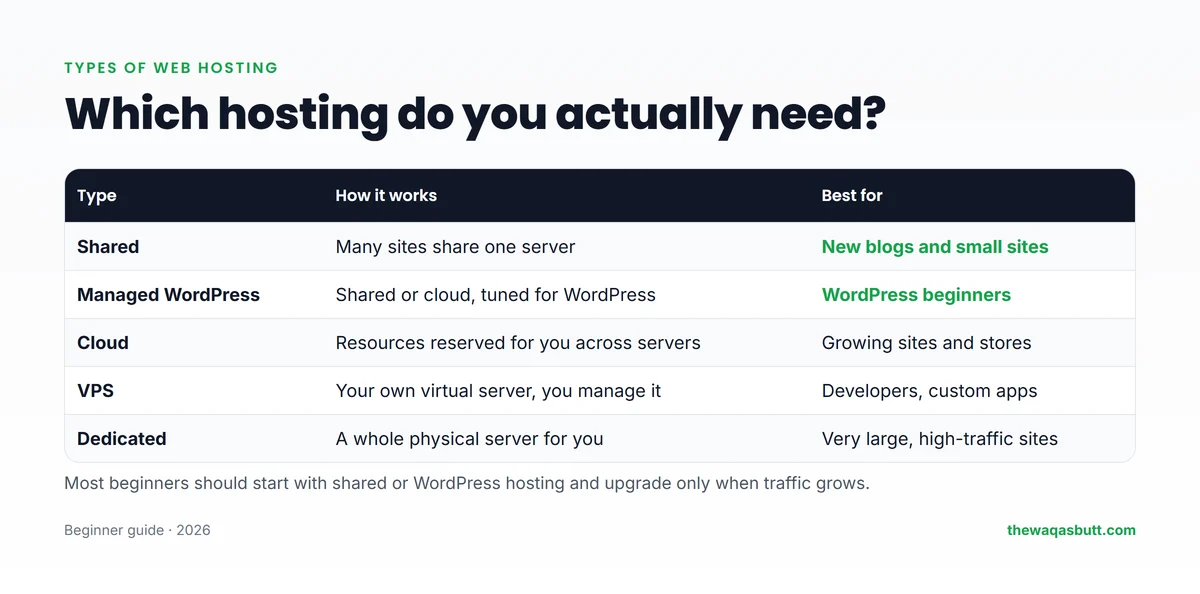
- Shared hosting: many websites share one server. It’s the cheapest option and fine for new blogs.
- Managed WordPress hosting: hosting tuned for WordPress, with easy installs, updates and caching.
- Cloud hosting: more resources reserved for you, good for growing sites and online stores.
- VPS hosting: your own virtual server. Powerful, but you manage more yourself.
- Dedicated hosting: a whole physical server. Only very large sites need this.
For a first blog, start with shared or WordPress hosting. You can upgrade later when your traffic grows, without changing your domain.
How much do a domain and hosting cost?
Prices change often, especially during sales, so here are real numbers from Hostinger’s website on 10 November 2026, during its Black Friday sale.
Hosting prices
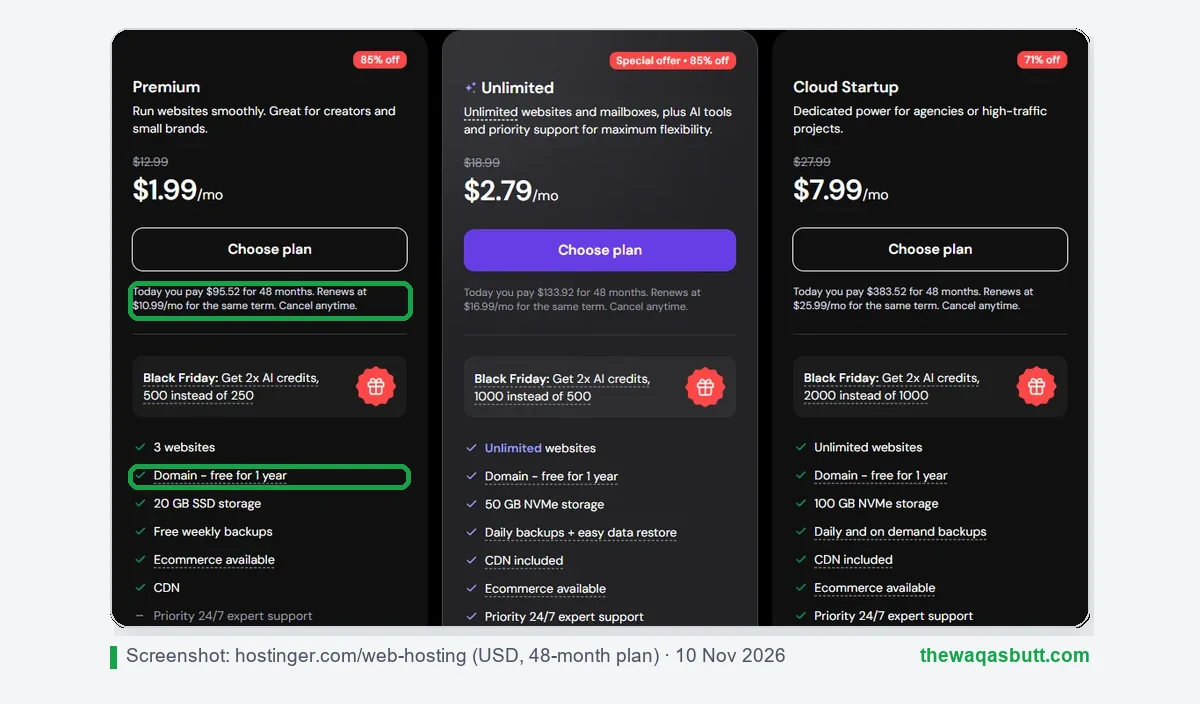
| Plan (48 months) | Sale price | You pay today | Renews at | Websites |
|---|---|---|---|---|
| Premium | $1.99/mo | $95.52 | $10.99/mo | 3 |
| Unlimited | $2.79/mo | $133.92 | $16.99/mo | Unlimited |
| Cloud Startup | $7.99/mo | $383.52 | $25.99/mo | Unlimited |
Domain prices
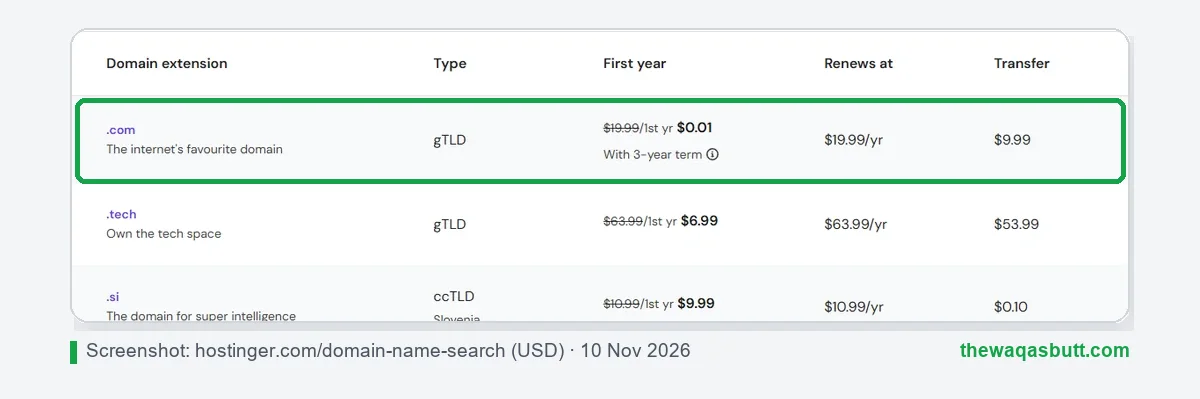
A .com at Hostinger cost $0.01 for the first year when you chose a 3-year term, but it renews at $19.99 a year. A .online was $0.99 for the first year and renews at $35.99.
The renewal trap
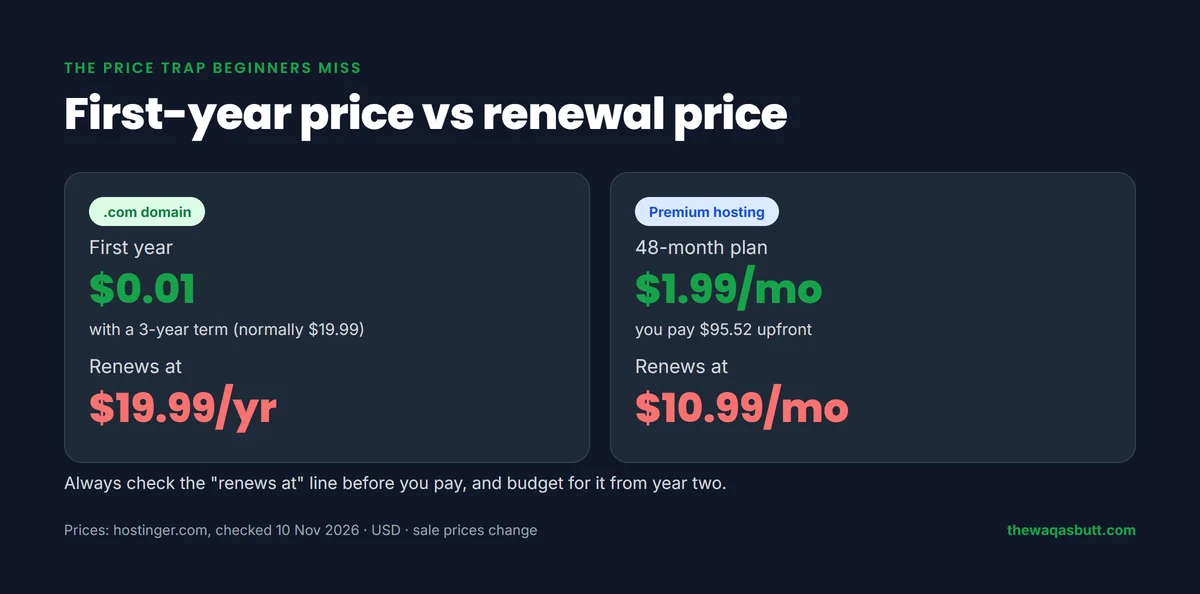
This is the part most guides skip. The big discount is only for your first term. After that, you pay the renewal price, which is much higher.
- The free domain with hosting is free for the first year only. After that, it renews at the normal domain price.
- Hosting renews at the “renews at” price shown under each plan, not the sale price.
- A longer first term locks in the low price for longer. That’s why the 48-month plan has the lowest monthly price.
My advice: before you pay, read the small “renews at” line and plan your budget for year two.
Should you buy both from the same company?
You can buy your domain from one company and your hosting from another. Both ways work.
Buying both from one company is easier for beginners. The domain is connected for you, and you have one dashboard and one bill. With Hostinger, the first-year domain is included with hosting plans.
Buying them separately gives you more control. If you ever leave your host, your domain stays where it is. The downside is that you must connect them yourself and track two renewals.
For a first blog, I’d keep it simple: buy both together, turn on auto-renew for the domain, and save your login details somewhere safe.
What about refunds?
Read this before you buy. Hostinger offers a 30-day money-back guarantee on hosting, but its refund policy lists domain renewals and successful domain transfers as not refundable.
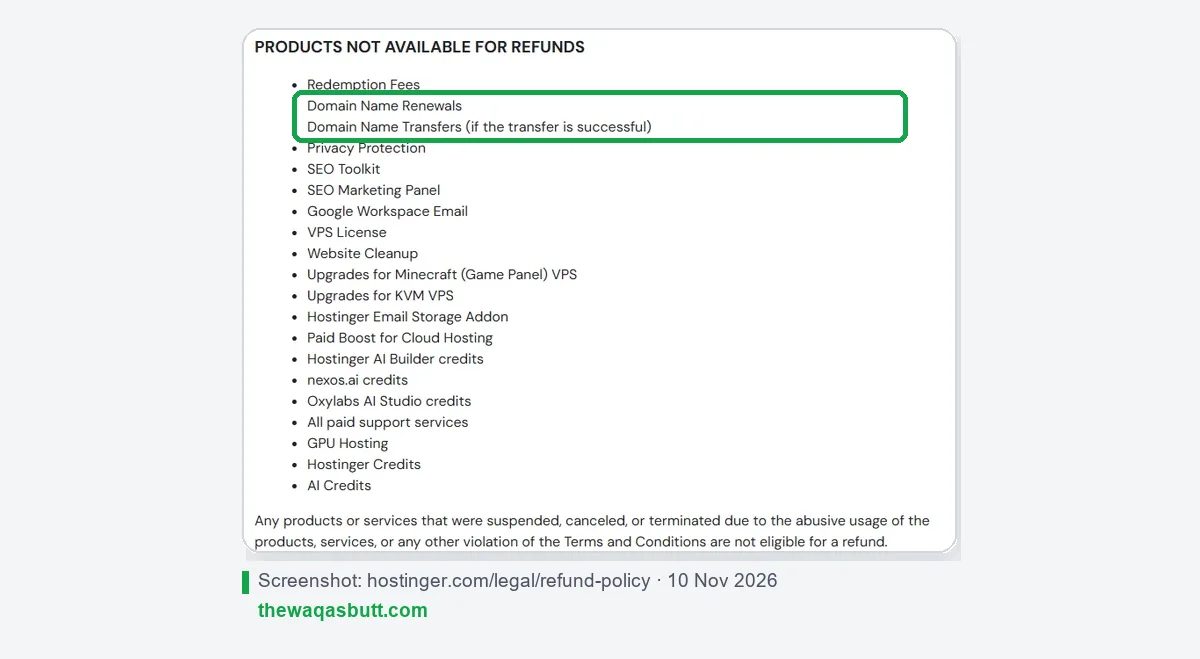
A new domain registration can only be refunded within 96 hours, and a free domain that came with a hosting deal is not refundable. So choose your domain name carefully before you buy.
How to connect a domain to hosting
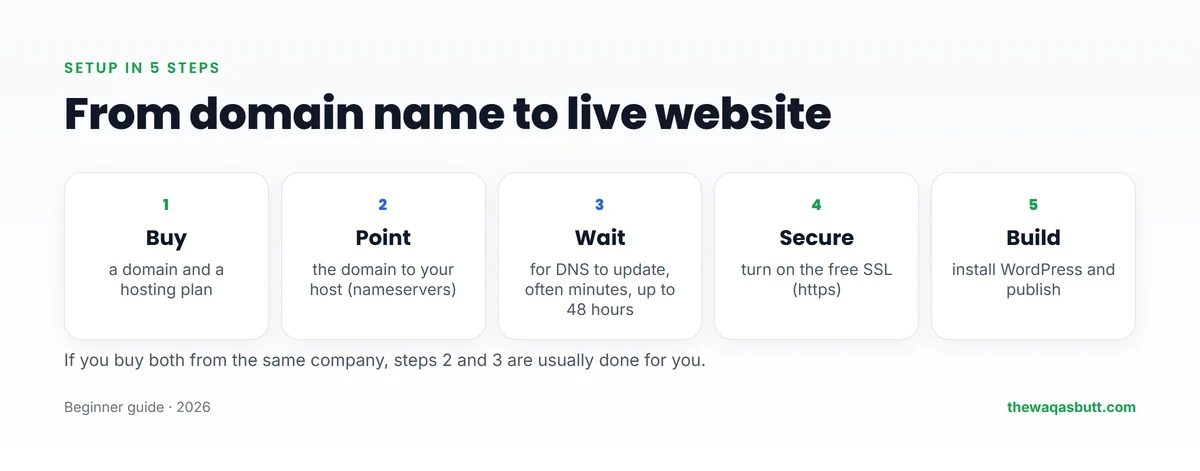
- Buy a domain and a hosting plan. If they’re from the same company, the connection is usually done for you.
- Find your host’s nameservers in your hosting dashboard. Most hosts give you two, such as ns1 and ns2.
- Change the nameservers at your domain registrar to the ones from your host.
- Wait for DNS to update. It often takes minutes, but can take up to 24–48 hours.
- Turn on SSL in your hosting panel so your site loads with https.
- Install WordPress with one click, then start building.
If you only want to point the website and keep email elsewhere, you can change the A record instead of the nameservers. Beginners should stick with nameservers.
Practical tips before you start
Most guides are written for US readers. Here’s what matters if you live anywhere else.
- Pay in USD with a card that works online. Check that your debit or credit card is enabled for international payments before checkout, and expect your bank’s exchange rate.
- Budget for renewals in dollars. If your currency weakens, your renewal costs more in local money.
- Choose a server near your readers. If your host lets you pick a data center, choose the one closest to most of your visitors for faster loading.
- Pick .com for a global audience. If your readers are mainly in one country, that country’s own ending can also work, but it’s sometimes sold only through a local registry, not every global registrar.
- Avoid unknown resellers. Very cheap local “hosting packages” sometimes register the domain in the seller’s name. Make sure the domain is registered in your name and email.
Common beginner mistakes
- Letting the domain expire. Turn on auto-renew. Expired domains can be bought by someone else.
- Comparing only the first-year price. Always compare the renewal price.
- Buying hosting that’s too big. A new blog doesn’t need VPS or dedicated hosting.
- Using a hard-to-spell name. Short, simple names are easier to share and remember.
- Not keeping backups. Check that your plan includes backups, and download one now and then.
Domain and hosting mistakes that are easy to avoid
These mistakes are small when you make them and expensive when you notice them. Each one takes only a few minutes to prevent.
Letting auto-renew stay off
If auto-renew is off, your domain simply expires on its end date. Check this setting right after you buy, and make sure the payment card saved on the account is still valid.
An expired card is one of the most common reasons a domain lapses by accident.
Registering the domain in someone else’s name
If a freelancer, agency or friend buys the domain for you, ask for it to be registered in your name, with your email address. The registered owner is the person who controls it.
If it is in someone else’s name, you may struggle to move it or renew it later.
Choosing only on the first-year price
A low first-year price can hide a high renewal price. Look at the renewal price and the cost of keeping both services for several years before you decide.
Forgetting the email tied to the domain
The registrar sends renewal notices, transfer approvals and security alerts to the email on the account. If that address stops working, you can miss every warning.
- Use an email address you check regularly.
- Don’t use an email address that ends with the same domain as the one you are protecting. If the domain lapses, that email stops working too.
- Update your contact details whenever they change.
Skipping domain privacy
If your registrar offers WHOIS privacy, switch it on. It keeps your personal address, phone number and email out of public records, which also helps reduce spam.
Scattering your logins
Domain, hosting, WordPress and email logins end up in different places, and then nobody can find them when something breaks. Keep them together in one secure place.
- Use a password manager rather than a notebook or a loose file.
- Turn on two-factor authentication for the registrar and hosting accounts.
- Make sure a trusted person knows how to reach the accounts if you are unavailable.
A quick review once or twice a year is enough. Check the renewal dates, the payment method and the contact email, and you will avoid most of these problems.
How I researched this guide
I want you to know exactly where these facts come from.
- Official sources: prices, domain terms and refund rules come from Hostinger’s web hosting page, domain search page and refund policy, all checked on 10 November 2026.
- Competitor guides: I read the top-ranking “domain vs hosting” guides in the US. Most skip the renewal price trap, explain DNS vaguely and say nothing about readers outside the US, so I covered those gaps here.
- My own setup: this website, thewaqasbutt.com, runs on WordPress with Hostinger hosting.
Prices shown were Black Friday sale prices and will change. Always check the final price at checkout.
Final thoughts
A domain name is your website’s address, and web hosting is the place where your website lives. You rent both, they work together through DNS, and you need both for a real website.
For your first blog, keep it simple: choose a short .com, buy shared or WordPress hosting, turn on auto-renew, and check the renewal price before you pay.
If you’re ready, you can start with Hostinger here and use code SK20 at checkout. For more tools I use, see my resources page.
FAQ
What is the difference between a domain name and web hosting?
A domain name is your website’s address, like thewaqasbutt.com. Web hosting is the server space where your website’s files are stored. The domain points visitors to the hosting, which sends them your website.
Do I need both a domain and hosting?
For a normal self-hosted website or WordPress blog, yes. You can buy a domain without hosting to reserve a name, but it won’t show a website until you connect it to hosting.
Is the free domain with hosting really free?
Only for the first year. After that it renews at the normal domain price. At Hostinger, a .com renewed at $19.99 a year when I checked on 10 November 2026.
Can I move my domain to another hosting company?
Yes. You can point your domain to a new host by changing its nameservers, or transfer the domain itself to another registrar. Your website files are moved separately.
How long does it take to connect a domain to hosting?
Usually a few minutes to a few hours. DNS changes can take up to 24–48 hours to update everywhere.
What happens if my domain expires?
Your website and domain email stop working. After a grace period, the domain can be released and anyone can register it. Turn on auto-renew to avoid this.
Which hosting is best for beginners?
Shared or managed WordPress hosting is enough for most new blogs. It’s cheap, easy to use and can be upgraded later when your traffic grows.
Want more simple guides for starting and growing a website? Join my newsletter.

One Comment