Disclosure: This article contains affiliate links. If you buy through them, I may earn a commission at no extra cost to you. I only recommend tools I’ve researched carefully, and my opinions are my own. Read the full disclaimer.
WordPress.com and WordPress.org have almost the same name, so most beginners think they’re the same thing. They’re not, and choosing the wrong one can cost you money or limit how you earn later.
Both use the same WordPress software. The difference is who hosts your site, who maintains it and whose rules you follow.
In this WordPress.com vs WordPress.org comparison, I’ll explain both in plain English, compare their real 2026 prices in USD, and show which one fits a blogger or freelancer who wants to earn online.
Quick verdict
- WordPress.org is free, open-source software. You install it on your own hosting and control everything.
- WordPress.com is a hosting service run by Automattic. It hosts WordPress for you, with a free plan and paid plans from $4 a month (billed yearly).
- Plugins: in 2026, WordPress.com allows plugins on all paid plans, starting with Personal. Many older articles still say you need Business.
- Best for earning online: self-hosted WordPress.org, because you set the rules for ads and affiliate links.
- Best for zero maintenance: WordPress.com, if you’re happy with its content and monetization rules.
For a self-hosted WordPress.org site, I use and recommend Hostinger. Use code SK20 at checkout.
In this comparison
- What is WordPress.org?
- What is WordPress.com?
- WordPress.com vs WordPress.org: key differences
- Pricing: what each really costs
- Plugins and themes
- Making money: ads, AdSense and affiliate links
- Maintenance, security and backups
- Ownership and moving your site
- Pros and cons
- Which one should you choose?
- Your first week on WordPress.org
- Common mistakes when choosing
- What other comparisons get wrong
- How I researched this comparison
- Final verdict
- FAQ
What is WordPress.org?
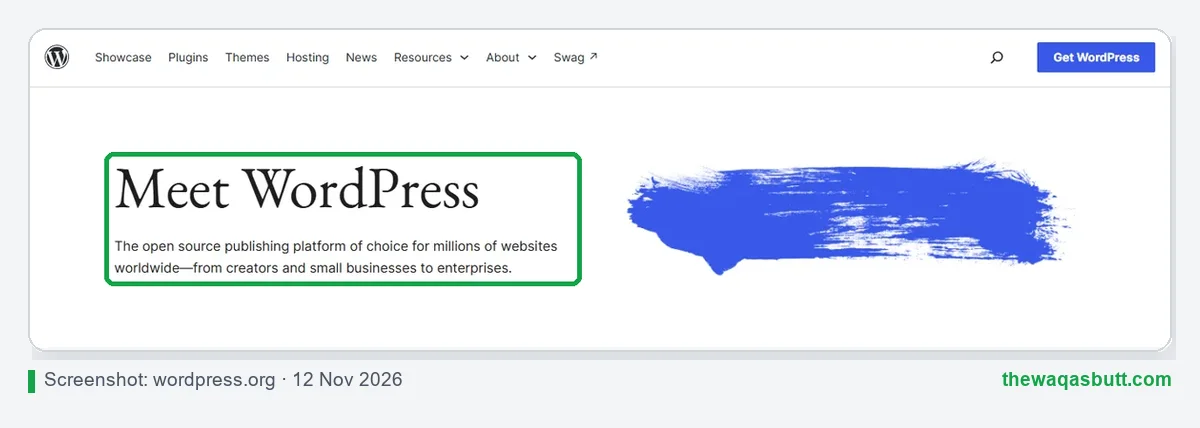
WordPress.org is the home of the free, open-source WordPress software. You download it (or install it with one click from your host) and run it on your own web hosting.
This is what people mean by “self-hosted WordPress”. You choose your host, your domain, your theme and your plugins. According to W3Techs, WordPress runs 39.2% of all websites (November 2026), and most of those are self-hosted.
This website, thewaqasbutt.com, is a self-hosted WordPress.org site on Hostinger.
What is WordPress.com?
WordPress.com is a hosting service run by Automattic, the company founded by WordPress co-founder Matt Mullenweg. It runs the WordPress software for you, so you don’t need to buy hosting separately.
You can start free, but free sites show WordPress.com ads to visitors and use a WordPress.com subdomain. Paid plans remove those ads, add a free custom domain for the first year and unlock more features.
WordPress.com vs WordPress.org: key differences
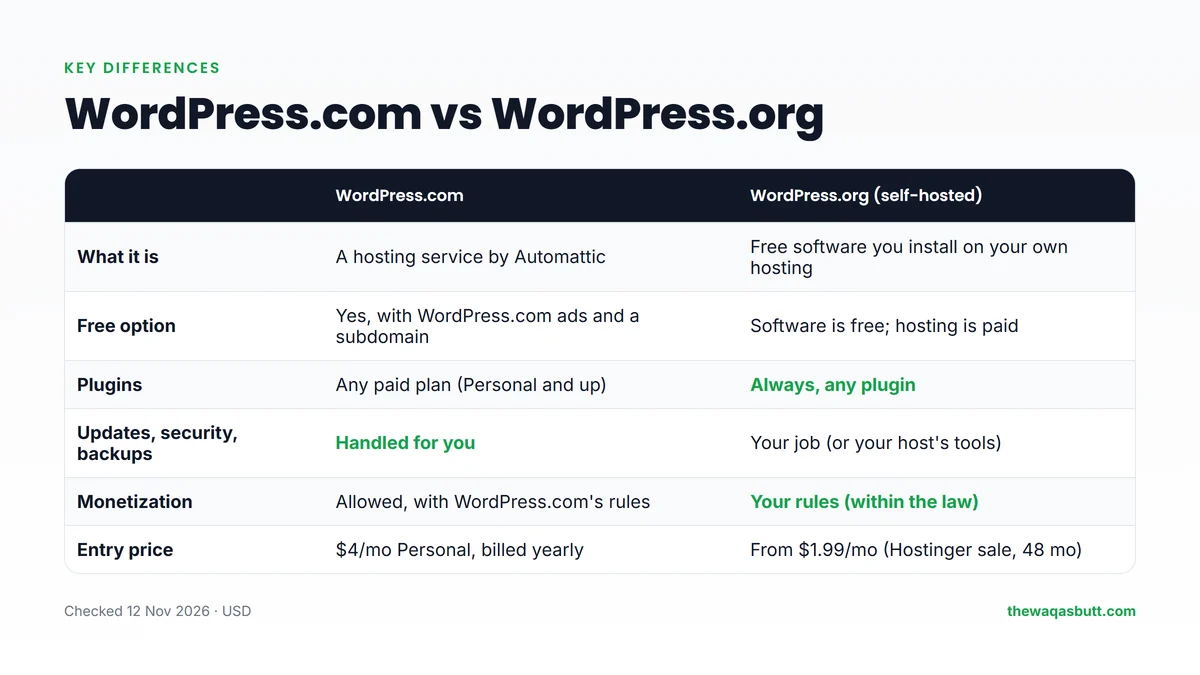
| WordPress.com | WordPress.org (self-hosted) | |
|---|---|---|
| What it is | A hosting service by Automattic | Free software you install on your own hosting |
| Free option | Yes, with WordPress.com ads and a subdomain | Software is free; you pay for hosting |
| Plugins | All paid plans (Personal and up) | Always, any plugin |
| Maintenance and security | Handled for you | Your job, with your host’s tools |
| Monetization | Allowed within WordPress.com’s rules | Your own rules (and each ad or affiliate program’s) |
| Entry price | $4/month Personal, billed yearly | From $1.99/month (Hostinger sale, 48-month term) |
| Refunds | 14 days (yearly plans), 7 days (monthly) | Depends on your host (Hostinger: 30 days on hosting) |
Pricing: what each really costs
Neither option is truly free if you want a professional site. Here’s what you actually pay.
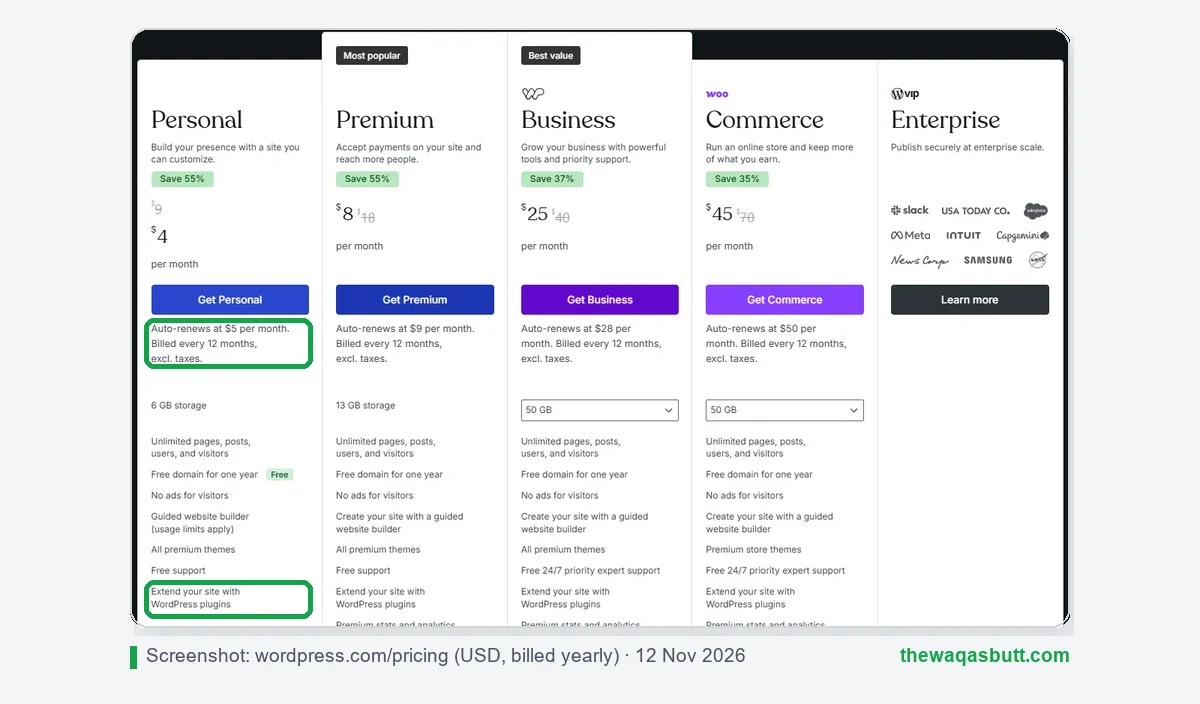
WordPress.com plans (billed yearly)
- Free: $0, with WordPress.com ads and a subdomain.
- Personal: $4/month ($9 if paid monthly). Renews at $5/month. 6 GB storage, plugins, no ads.
- Premium: $8/month ($18 monthly). Renews at $9/month. Adds payment buttons, premium stats and WordAds eligibility.
- Business: $25/month ($40 monthly). Renews at $28/month. 50 GB, real-time backups, staging and priority support.
- Commerce: $45/month ($70 monthly). Renews at $50/month. WooCommerce store features.
WordPress.org costs
The software is free. You pay for hosting and a domain. When I checked on 10 November 2026, during a sale, Hostinger’s Premium plan was $1.99/month on a 48-month term ($95.52 upfront), with a free domain for the first year. It renews at $10.99/month.
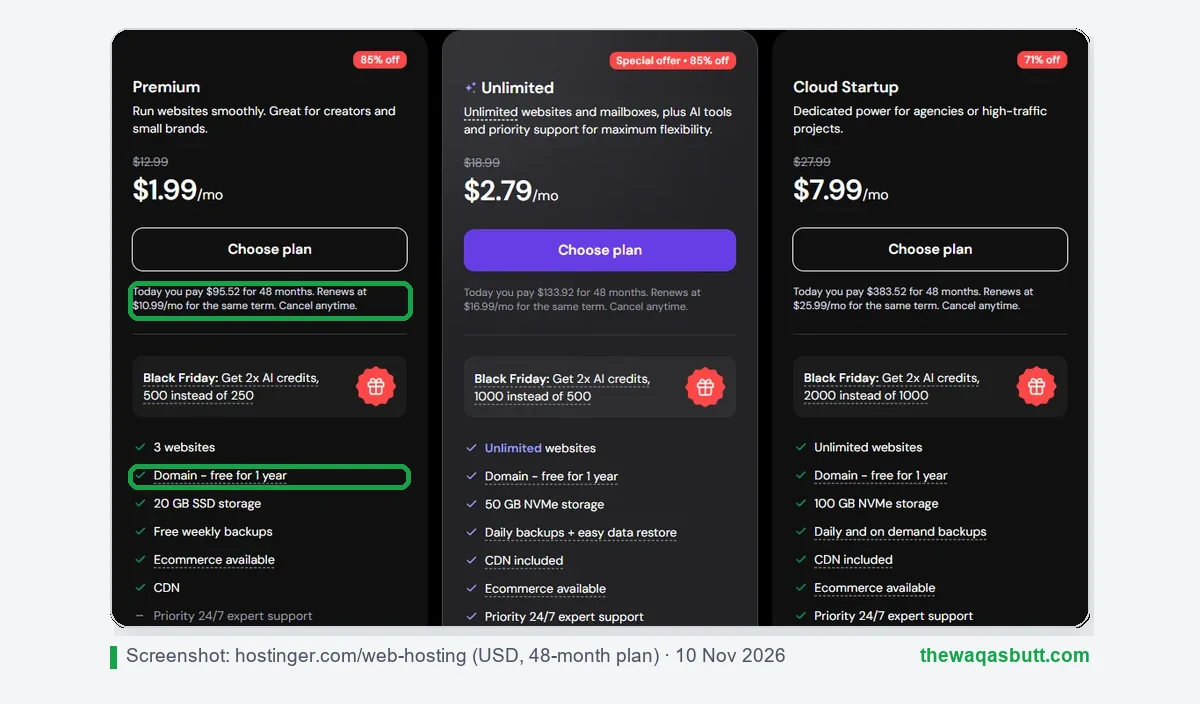
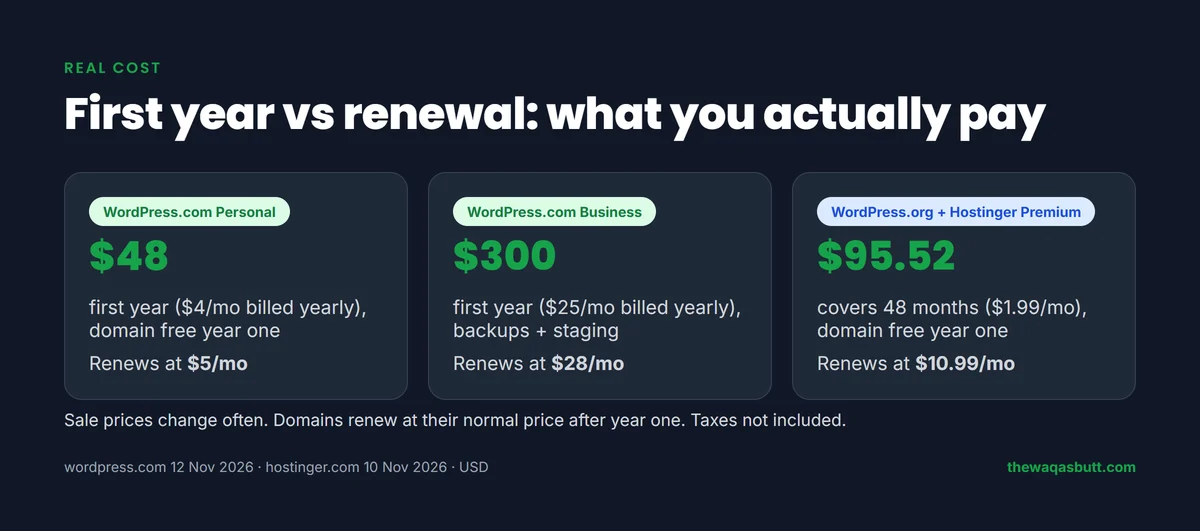
The honest picture: WordPress.com Personal is cheap for the first year ($48) and renews at only $5/month. Self-hosting is cheapest when you pay for several years upfront, and it gives you more freedom. Always compare the renewal price, not just the sale price.
Plugins and themes
This is the biggest change most comparisons miss. WordPress.com’s support page now says installing plugins is available on all paid plans: Personal, Premium, Business and Commerce. Free sites can’t install plugins.

On self-hosted WordPress.org, you can install any plugin or theme, with no plan restrictions. The official directory lists over 78,000 free plugins, and you can also upload premium ones.
So the plugin gap is much smaller than it used to be. The real difference now is cost per feature and whose rules apply.
Making money: ads, AdSense and affiliate links
If you want to earn from a blog, this section matters most.
Ads on WordPress.com
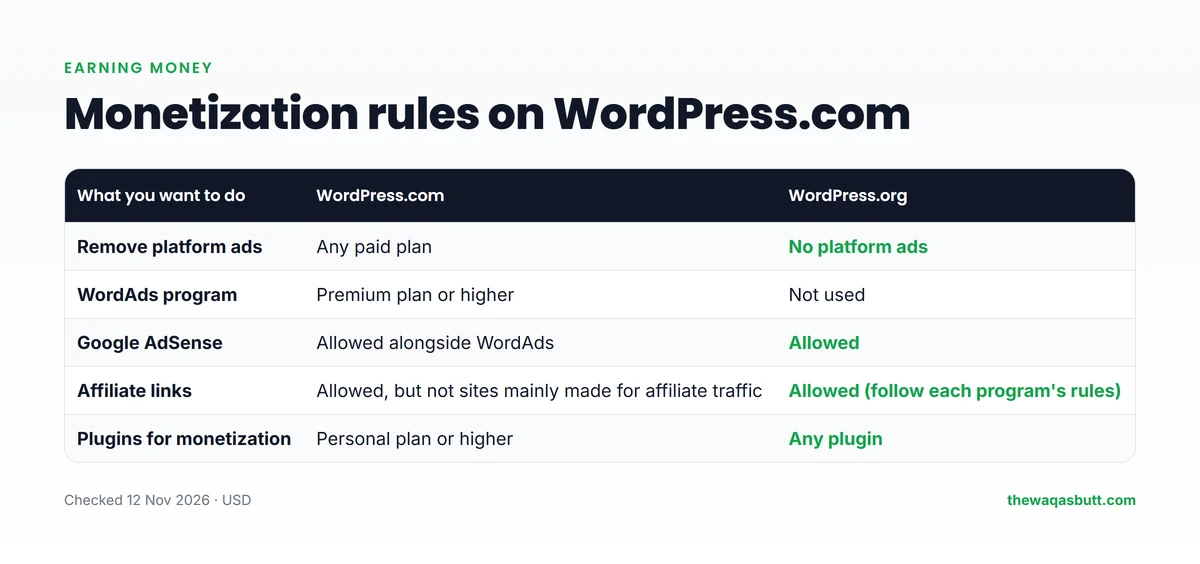
WordPress.com has its own ad program, WordAds, which needs the Premium plan or higher. Its support page also says you can run other ad programs such as Google AdSense at the same time, though it recommends using one.

Affiliate links on WordPress.com
Affiliate links are allowed, but WordPress.com’s monetization page says it does not allow sites that exist primarily to drive traffic to affiliate links. Your blog’s main purpose must be original content.
If you plan an affiliate or review site, like many of my readers, that rule is a real risk. On self-hosted WordPress.org, you only follow the law and each affiliate program’s own rules.
Ads and affiliate links on WordPress.org
On a self-hosted site, you can add AdSense, other ad networks and affiliate links freely. You still need honest disclosures and must follow each program’s policies.
Maintenance, security and backups
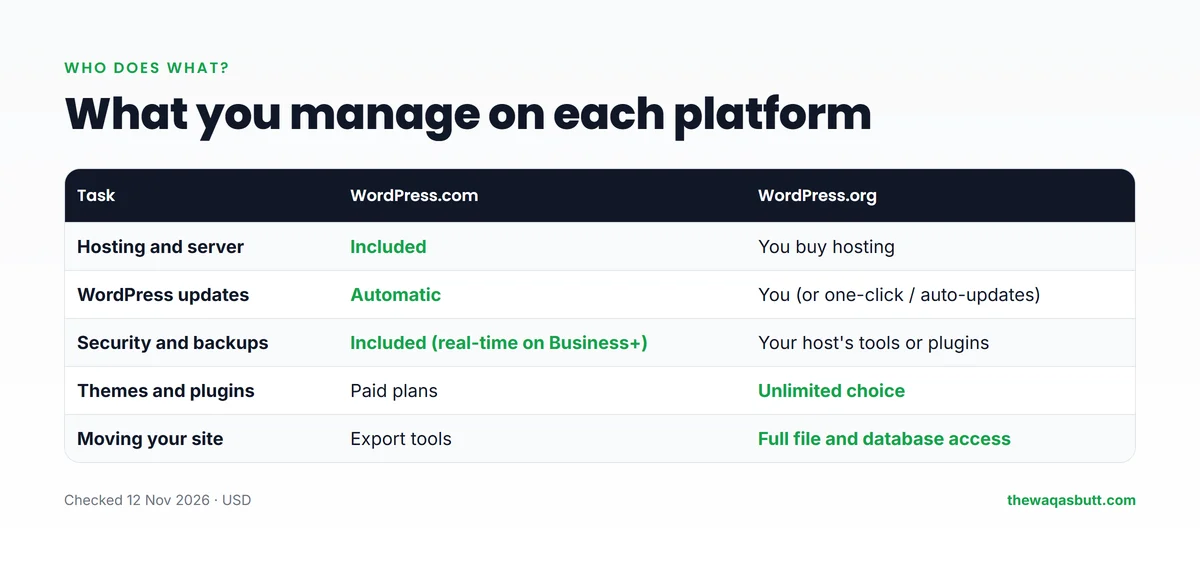
This is where WordPress.com wins for beginners. It handles hosting, WordPress updates and security for you. Real-time backups and a staging site come with the Business plan and above.
With WordPress.org, you are responsible for updates, backups and security. In practice, a good host makes this easy: one-click WordPress installs, automatic updates and backups are common hosting features. Check what your plan includes before you buy.
Ownership and moving your site
On WordPress.org, you have full access to your files and database. You can move to another host anytime, or even sell your site.
On WordPress.com, your content is yours and you can export your posts, pages and comments as an XML file to move to another WordPress site. But the platform’s rules apply while you’re there.
How to move from WordPress.com to WordPress.org
- Buy hosting and install WordPress on it with your host’s one-click installer.
- Export your content from WordPress.com as an XML file (posts, pages and comments).
- Import it into your new site with the WordPress importer under Tools → Import.
- Check your media and re-add any plugins, theme settings and menus you need.
- Point your domain to the new host, then test every important page before cancelling your old plan.
Moving from WordPress.com to WordPress.org later is possible, but it’s easier to start on the platform you’ll keep. If you’re unsure how domains and hosting fit together, read my guide to domain names and web hosting.
Pros and cons
WordPress.com
Pros
- No hosting setup, updates or security work.
- Cheap entry plan: $4/month billed yearly, renewing at $5/month.
- Plugins on all paid plans.
- Refunds within 14 days on yearly plans and 7 days on monthly plans.
Cons
- The free plan shows WordPress.com ads and uses a subdomain.
- Sites made mainly for affiliate traffic aren’t allowed.
- WordAds needs Premium, and backups with staging need Business.
- Business costs $25/month billed yearly, much more than basic hosting.
WordPress.org (self-hosted)
Pros
- Full control over themes, plugins, code and monetization.
- Low long-term cost with multi-year hosting.
- Easy to move hosts or sell the site later.
Cons
- You need to buy and manage hosting.
- You’re responsible for updates, backups and security.
- Hosting renewal prices are much higher than sale prices.
Which one should you choose?
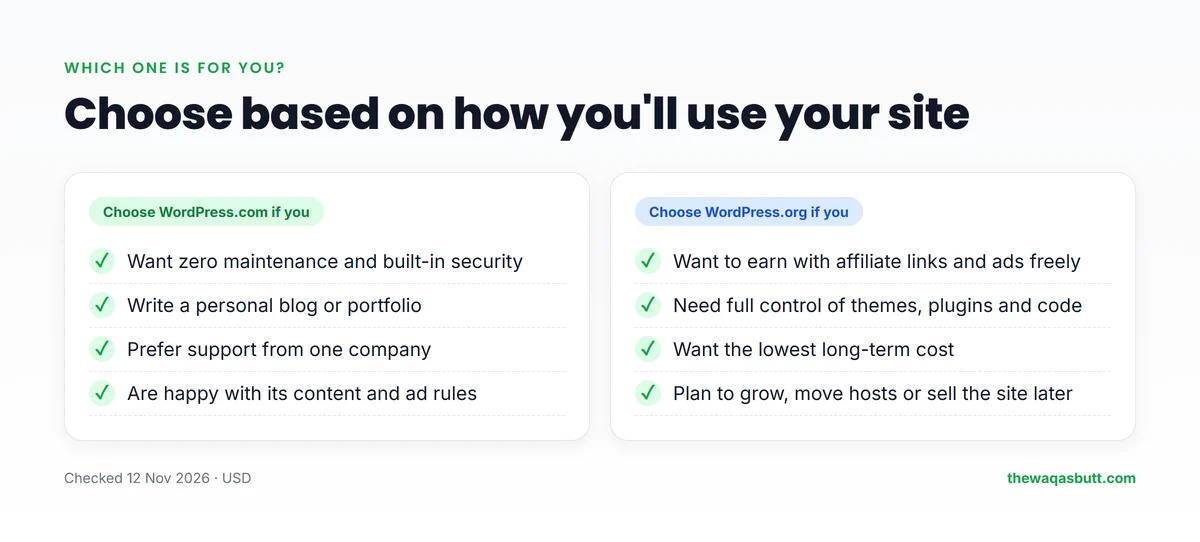
Choose WordPress.com if you:
- Want a personal blog or portfolio with no technical work.
- Prefer one company to handle hosting, security and support.
- Don’t plan to run an affiliate-focused site.
Choose WordPress.org if you:
- Want to earn with affiliate links, AdSense or your own products, on your own terms.
- Want full control and the lowest long-term cost.
- Plan to grow, move hosts or sell the site one day.
For most of my readers, who want to earn online from anywhere in the world, I recommend self-hosted WordPress.org. It’s what I use for this site.
Practical tips before you start
- Both are priced in US dollars. Make sure your debit or credit card is enabled for international online payments, and expect your bank’s exchange rate.
- Budget for renewals. If your local currency weakens, dollar renewals get more expensive each year, so compare multi-year prices.
- Think about your income plan first. If affiliate links will be your main income, avoid building on a platform whose rules limit affiliate-focused sites.
- Test before you commit. WordPress.com refunds yearly plans within 14 days; Hostinger offers a 30-day money-back guarantee on hosting. Domains have stricter refund rules on both.
Your first week on WordPress.org
If you choose self-hosted WordPress.org, the first few days decide how smooth everything feels later. This is the checklist I’d follow on a new site:
- Install WordPress with your host’s one-click installer and log in at yourdomain.com/wp-admin.
- Turn on SSL (https) in your hosting panel. Most hosts include a free certificate.
- Set your permalinks under Settings → Permalinks to “Post name”, so URLs look like /my-first-post/ instead of numbers.
- Pick one lightweight theme and change only what you need. Fewer extras means a faster site.
- Add a few essential plugins: an SEO plugin, a caching plugin and a backup solution. Avoid installing dozens at once.
- Create the basic pages: About, Contact, Privacy Policy and, if you use affiliate links, a Disclaimer.
- Turn on automatic backups and download one copy to your computer, so you can recover from mistakes.
- Write and publish your first post, then connect the site to Google Search Console so it can be found.
None of these steps needs coding. Spend one evening on them, and your WordPress.org site will be in better shape than many older blogs.
After that first week, keep a light routine: update plugins and themes once a week, check that your latest backup finished, and look at Search Console once a month for errors. Ten minutes a week is usually enough for a small blog.
Common mistakes when choosing
- Choosing only on the first-year price. Both WordPress.com plans and hosting renew at higher prices, so compare the renewal cost too.
- Starting on the free WordPress.com plan for a money-making blog, then having to move once you need your own domain, plugins or affiliate links.
- Assuming WordPress.org is free. The software is free, but you still pay for hosting and a domain every year.
- Skipping backups on self-hosted sites. A broken plugin or theme update is easy to fix when you have a recent backup.
- Mixing up the two names when searching for help. Many tutorials only apply to one of them, so check which one an article is about before following it.
What other comparisons get wrong
When I read the top-ranking “WordPress.com vs WordPress.org” articles in the US, a few problems kept coming up:
- Old plugin rules: most still say you need the Business plan for plugins. WordPress.com now allows them on all paid plans.
- Stale prices and storage limits from 2020–2024.
- Contradictions about ads: some say you can’t monetize WordPress.com at all; others say you can.
- Hidden interests: many are written by web hosts or theme sellers, often without a clear affiliate disclosure.
- No word on affiliate rules, which matter most for people who want to earn.
How I researched this comparison
- Official sources: WordPress.com’s pricing page and its support pages on plugins, refunds, WordAds, monetization and export, all checked on 12 November 2026.
- Other data: the WordPress.org plugin directory, W3Techs usage statistics, and Hostinger’s pricing page (10 November 2026).
- Competitor articles: I read 10 top-ranking comparisons in the US and noted what’s outdated.
- My own setup: thewaqasbutt.com is a self-hosted WordPress.org site on Hostinger.
Final verdict
WordPress.com is the easier choice: no maintenance, cheap entry plans and, in 2026, plugins on every paid plan. WordPress.org is the freer choice: your rules, your files and usually a lower long-term cost.
If your goal is to earn online with a blog, affiliate links or ads, I recommend self-hosted WordPress.org. Pay for a few years of hosting upfront, check the renewal price, and keep backups.
You can start with Hostinger here and use code SK20 at checkout. For more tools I use, see my resources page.
FAQ
What is the main difference between WordPress.com and WordPress.org?
WordPress.org is free software you install on your own hosting, with full control. WordPress.com is a hosting service by Automattic that runs WordPress for you, with a free plan and paid plans.
Is WordPress.org free?
The software is free. You pay for web hosting and a domain. Hostinger’s Premium plan was $1.99 a month on a 48-month term during a November 2026 sale, renewing at $10.99 a month.
Can I install plugins on WordPress.com?
Yes, on any paid plan. WordPress.com’s support page says plugins are available on Personal, Premium, Business and Commerce. The free plan can’t install plugins.
Can I use Google AdSense on WordPress.com?
WordPress.com’s support page says you can run WordAds and other ad programs such as Google AdSense at the same time. WordAds itself needs the Premium plan or higher.
Can I do affiliate marketing on WordPress.com?
Affiliate links are allowed, but WordPress.com doesn’t allow sites that exist primarily to drive traffic to affiliate links. For affiliate-focused sites, self-hosted WordPress.org is safer.
Which is better for beginners?
WordPress.com is easier because hosting and maintenance are handled for you. WordPress.org needs a little setup, but gives you more control and freedom to earn.
Can I move from WordPress.com to WordPress.org later?
Yes. WordPress.com lets you export your posts, pages and comments as an XML file, which you can import into a self-hosted WordPress site.
Want honest guides for building and earning from your website? Join my newsletter.