Disclosure: This article contains affiliate links. If you buy through them, I may earn a commission at no extra cost to you. I only recommend tools I’ve researched carefully, and my opinions are my own. Read the full disclaimer.
Look at the address bar of this page. You’ll see https and a small icon showing the connection is secure. That comes from an SSL certificate.
Without one, browsers like Chrome mark your site as “Not secure”, and many visitors leave before reading a word.
In this guide, I’ll explain what an SSL certificate is, how it works, the different types, and which one a blogger or small business actually needs. I’ll use this website’s real certificate as an example, so you can see how it looks in practice.
Quick answer
- An SSL certificate is a small digital file that proves a website’s identity and lets browsers create an encrypted (https) connection.
- Types by validation: DV (domain only), OV (organization checked) and EV (strictest checks). All use the same encryption.
- Types by coverage: single-domain, wildcard (all subdomains) and multi-domain (several names).
- What most sites need: a free DV certificate, usually included with your hosting.
- Lifetimes are shrinking: the maximum is 200 days in 2026, falling to 47 days by 2029, so automatic renewal matters.
If you’re starting a website, Hostinger includes free SSL certificates with its hosting. Use code SK20 at checkout.
In this guide
- What is an SSL certificate?
- SSL vs TLS: what’s the difference?
- How does an SSL certificate work?
- Why your website needs SSL
- SSL certificate types by validation
- SSL certificate types by coverage
- A real example: this website’s certificate
- Free vs paid SSL certificates
- Certificates are getting shorter
- How to check and fix SSL on WordPress
- Which SSL certificate do you need?
- How to read a site’s certificate in your browser
- Common SSL warnings and what they mean
- How I researched this guide
- Final thoughts
- FAQ
What is an SSL certificate?
An SSL certificate is a digital certificate installed on a web server. It does two jobs:
- Proves identity: it shows the browser that the site really is the domain you typed, not a fake copy.
- Enables encryption: it lets the browser and server scramble the data between them, so others on the network can’t read it.
Certificates are issued by trusted companies called certificate authorities (CAs), such as Let’s Encrypt, DigiCert or Sectigo. Browsers trust them, so they trust the certificates they sign.
When a site has a valid certificate, its address starts with https:// instead of http://. The “s” stands for secure.
SSL vs TLS: what’s the difference?
Here’s something most guides skip: the original SSL protocol is old and no longer used. Modern websites use its replacement, TLS (Transport Layer Security).
People still say “SSL certificate” out of habit, and hosts still sell “SSL”. In practice, an “SSL certificate” today is a TLS certificate. You don’t need to do anything different; it’s just a naming thing.
How does an SSL certificate work?
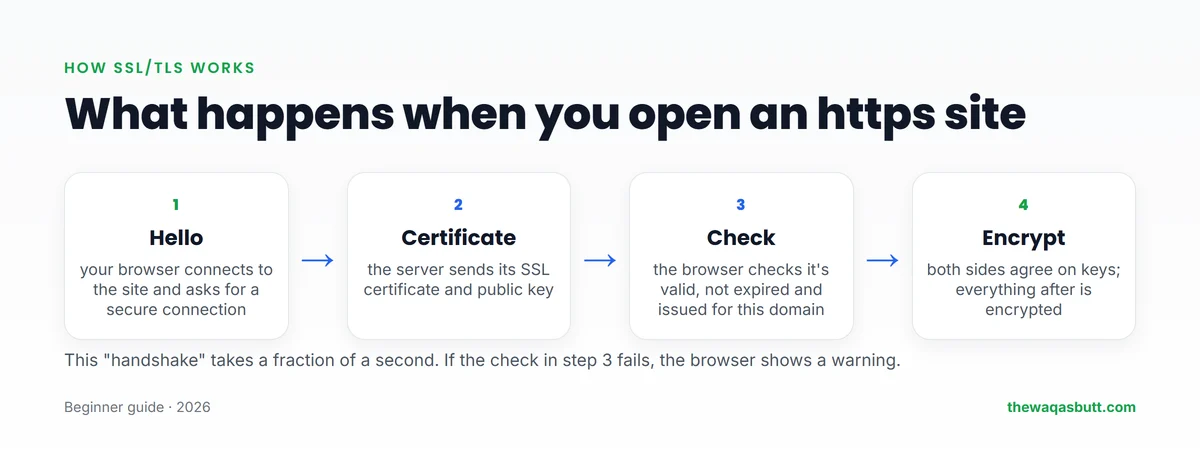
Every time you open an https website, your browser and the server do a quick handshake:
- Your browser connects and asks for a secure connection.
- The server sends its certificate and public key.
- The browser checks that the certificate is valid, not expired and issued for that exact domain by a trusted CA.
- Both sides agree on secret keys, and everything after that is encrypted.
This takes a fraction of a second. If the check fails, for example because the certificate expired, the browser shows a full-page warning instead of your site.
Why your website needs SSL
Browsers warn visitors
Since July 2018, Google Chrome marks all plain http pages as “not secure”. Google’s announcement also said Chrome would show a red warning when users type data into http pages.
It protects your visitors’ data
Login forms, contact forms, comments and checkout pages all send data. SSL encrypts it on the way to your server.
It’s a small Google ranking signal
In August 2014, Google announced it would use HTTPS as a ranking signal. But it called it “a very lightweight signal”, affecting fewer than 1% of queries at the time and carrying less weight than high-quality content.

So SSL won’t push a weak page to the top, but every serious site needs it anyway.
SSL certificate types by validation
The first way to group certificates is by how much the CA checks before issuing one.
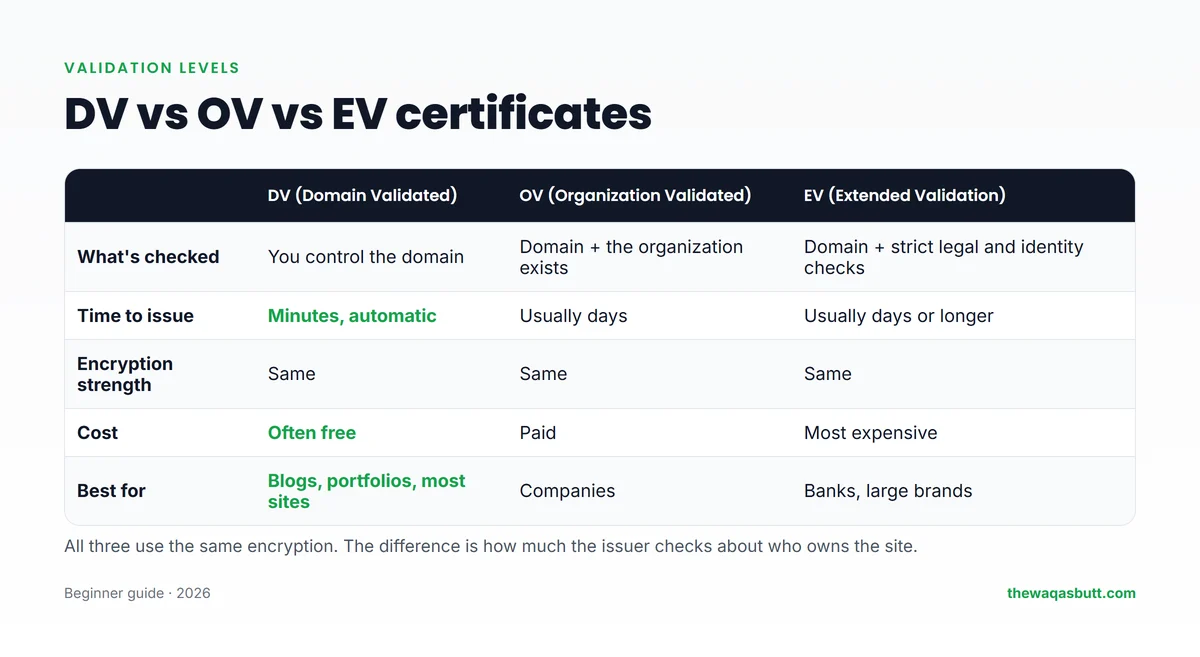
| Type | What’s checked | Issued in | Best for |
|---|---|---|---|
| DV (Domain Validated) | You control the domain | Minutes, automatic | Blogs, portfolios, most websites |
| OV (Organization Validated) | Domain + the organization is real | Usually days | Registered companies |
| EV (Extended Validation) | Domain + strict legal and identity checks | Usually days or longer | Banks and large brands with compliance needs |
Domain Validated (DV)
The CA only checks that you control the domain, usually automatically through a file on your server or a DNS record. It’s fast, often free, and what most websites use, including this one.
Organization Validated (OV)
The CA also checks that your organization legally exists. The company name appears in the certificate details, but visitors rarely look there.
Extended Validation (EV)
EV has the strictest checks. Many guides still say EV shows a green bar with your company name in the address bar. That’s outdated. Modern browsers no longer show that green bar, so EV mostly matters for compliance, not for what visitors see.
SSL certificate types by coverage
The second way to group certificates is by how many domain names they protect.
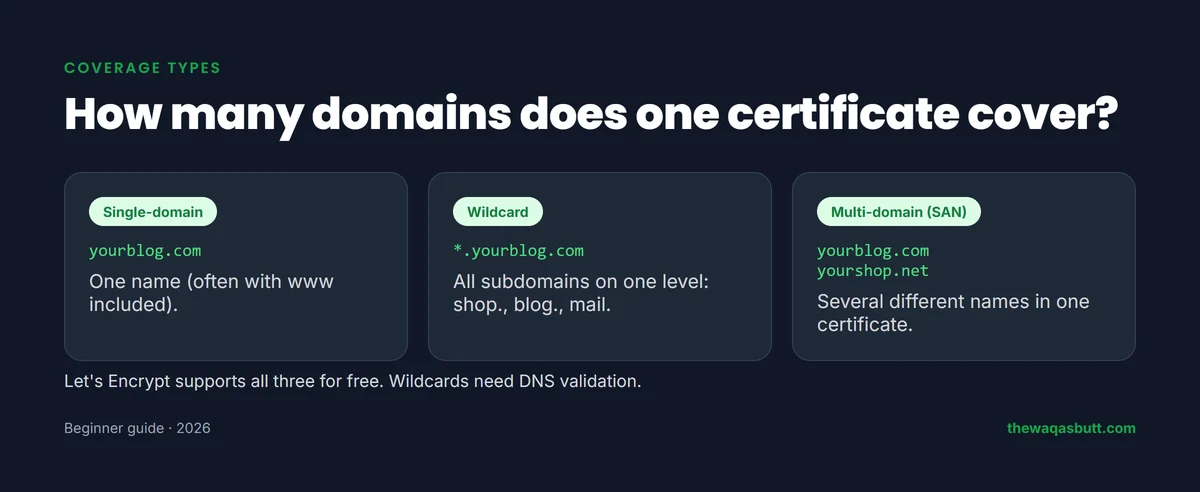
- Single-domain: one name, such as yourblog.com. Many certificates also include www.yourblog.com.
- Wildcard: one domain and all its subdomains on one level, such as *.yourblog.com (shop., blog., mail.).
- Multi-domain (SAN or UCC): several different names in one certificate, such as yourblog.com and yourshop.net.
According to Let’s Encrypt’s FAQ, it supports multiple names (SAN) and wildcard certificates for free. Wildcards need the DNS validation method, which uses a TXT record. If DNS records are new to you, see my guide to DNS records explained.
What about self-signed certificates?
A self-signed certificate is one you create yourself, without a CA. It encrypts data, but browsers don’t trust it and show a warning. Use it only for testing, never on a public website.
A real example: this website’s certificate
I checked the live certificate of thewaqasbutt.com on 12 November 2026. Here’s what it contains:
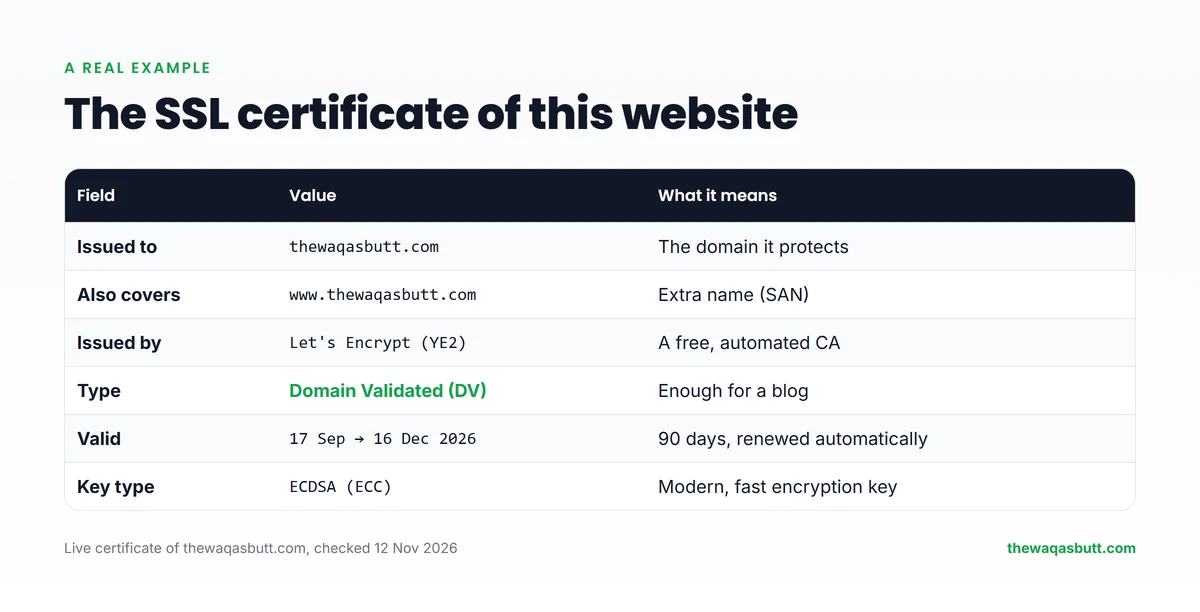
- Issued to: thewaqasbutt.com, and it also covers www.thewaqasbutt.com.
- Issued by: Let’s Encrypt, a free certificate authority.
- Type: Domain Validated (DV).
- Valid: 17 September to 16 December 2026, which is 90 days.
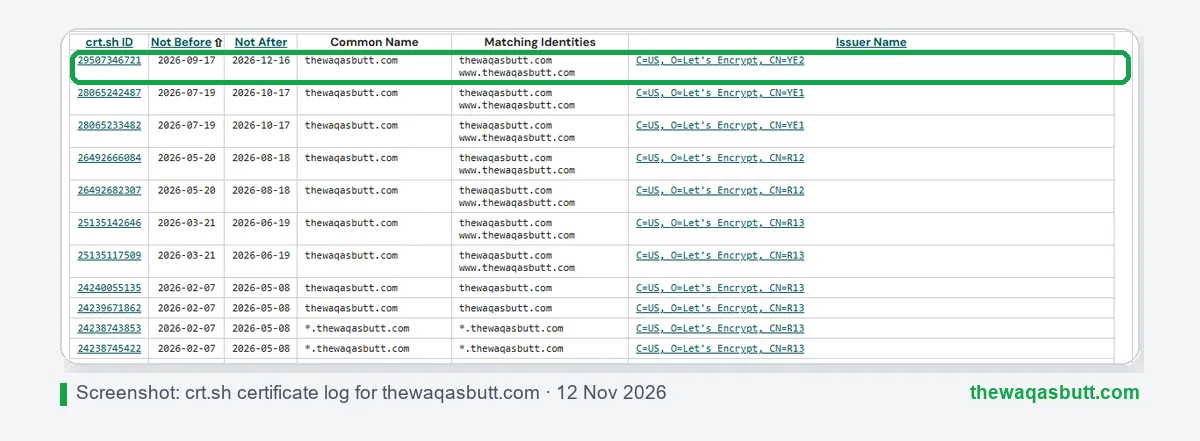
You can see every certificate ever issued for a domain in public Certificate Transparency logs. The free site crt.sh shows this site’s history: a new Let’s Encrypt certificate roughly every two months, renewed automatically by the host.
Free vs paid SSL certificates
This is where beginners waste the most money. A free DV certificate gives the same encryption as an expensive one.
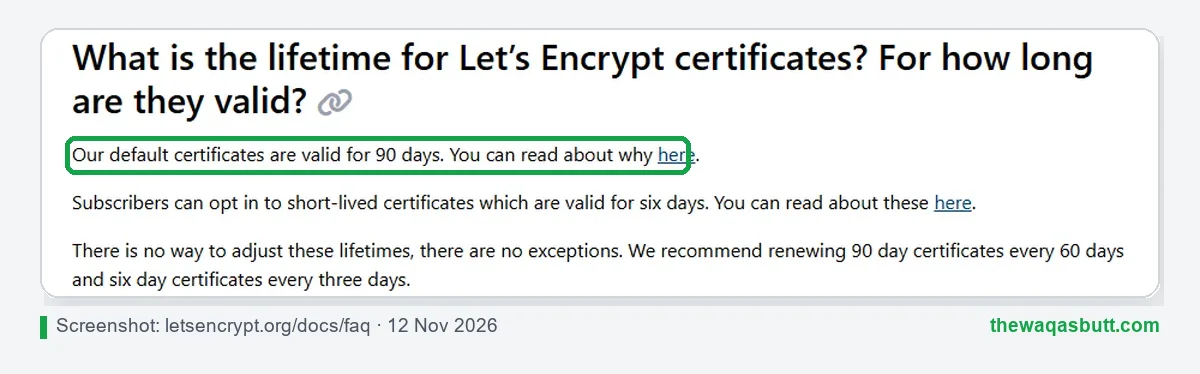
Let’s Encrypt issues free certificates valid for 90 days, and its FAQ says it has no plans to issue OV or EV certificates. Most hosts set it up and renew it for you.
Hostinger, for example, says it offers unlimited free SSL certificates with its web hosting.
When paid makes sense: you need OV or EV for business or compliance reasons, a warranty, or support from a commercial CA. For a blog, portfolio or small store, it usually doesn’t.
Certificates are getting shorter
In 2025, the CA/Browser Forum, the group of browser makers and CAs that sets the rules, approved ballot SC-081v3 to cut maximum certificate lifetimes step by step:
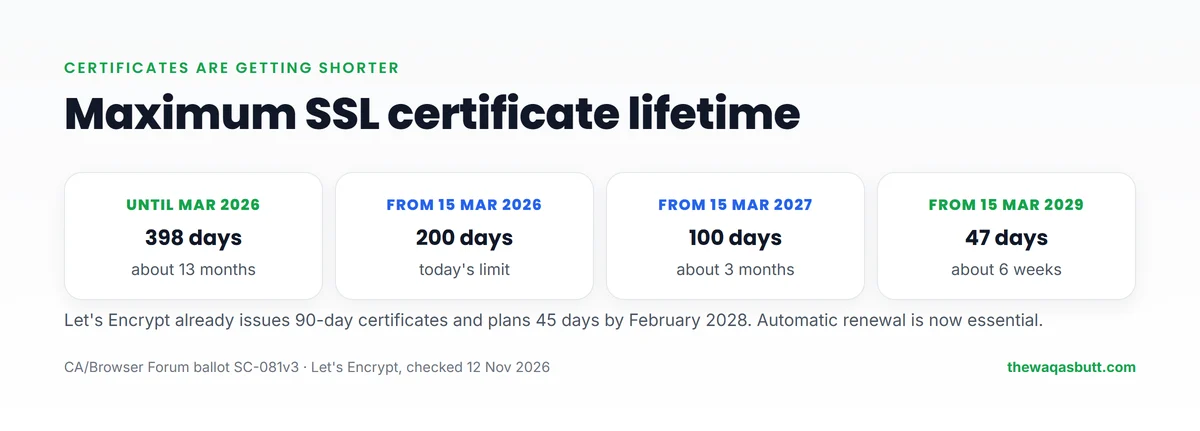
- Until 15 March 2026: 398 days.
- From 15 March 2026: 200 days (today’s limit).
- From 15 March 2027: 100 days.
- From 15 March 2029: 47 days.

Let’s Encrypt says it will cut its own maximum lifetime to 45 days by February 2028. The message for site owners is simple: don’t renew certificates by hand. Use a host that renews them automatically.
How to check and fix SSL on WordPress
Check your certificate
- Open your site in Chrome and click the icon to the left of the address.
- Choose Connection is secure, then Certificate is valid to see who issued it and when it expires.
- Search your domain on crt.sh to see its certificate history.
Turn on SSL in WordPress
- Activate SSL for your domain in your hosting dashboard. On many hosts, including Hostinger, it’s free and often automatic.
- In WordPress, go to Settings → General and make sure both addresses start with https://.
- Fix mixed content: if some images or scripts still load over http, the padlock may disappear. Update old links to https, or use a trusted search-and-replace tool or SSL plugin.
- Redirect http to https so every visitor lands on the secure version. Many hosts offer a “force HTTPS” switch.
Always take a backup before changing site addresses. New to domains and hosting? Start with my guide to domain names and web hosting.
Which SSL certificate do you need?
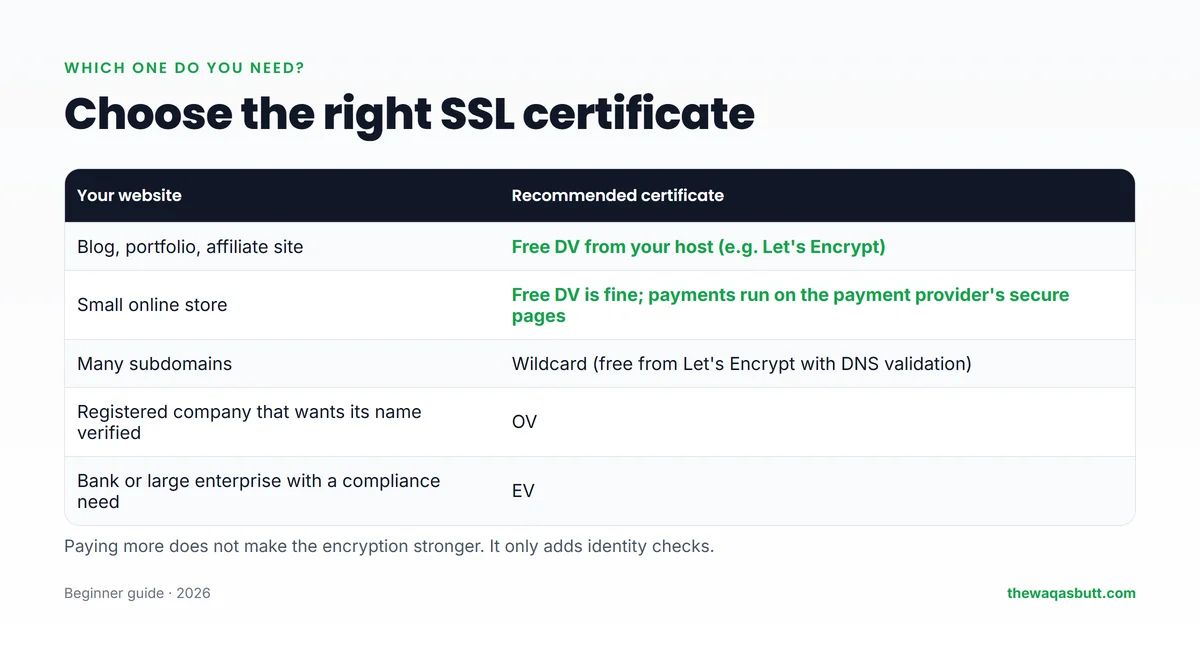
- Blog, portfolio or affiliate site: a free DV certificate from your host.
- Small online store: free DV is usually fine, especially when payments happen on the payment provider’s own secure pages.
- Many subdomains: a wildcard certificate, free from Let’s Encrypt with DNS validation.
- Registered company that wants its name in the certificate: OV.
- Bank or enterprise with compliance rules: EV.
If you’re planning a blog or deciding between WordPress.com and WordPress.org, note that both options can run on https; on self-hosted WordPress, your host provides the certificate.
How to read a site’s certificate in your browser
You can inspect the certificate of any website in a few clicks. It’s a good habit before you type a password or card details on a site you don’t know. The exact menu names differ a little between browsers, but the idea is the same.
- Click the padlock or site-information icon to the left of the address. Newer versions of some browsers show a settings-style icon instead of a padlock.
- Open the connection details. Look for wording like “Connection is secure” and click it.
- Choose the certificate option. It is usually called “Certificate is valid” or “Show certificate”.
- Read the details in the window that opens.
What to look for
- Issued to (domain names): the website name should match the address you typed. Look at the list of alternative names too, because one certificate can cover several.
- Issued by (issuer): the certificate authority that signed it. You should see a name of a well-known authority.
- Valid from and valid to: today’s date should fall between the two. If the end date has passed, the certificate has expired.
A valid certificate proves that the connection is encrypted and that the name matches. It does not prove that the website owner is trustworthy. A scam site can have a perfectly valid certificate, so keep checking the address and the content too.
Common SSL warnings and what they mean
When the browser can’t trust a certificate, it shows a full-page warning. The wording differs by browser, but the causes are mostly the same. Here are the usual ones, and the usual fix.
Expired certificate
The certificate’s end date has passed, so the browser no longer trusts it. This is the most common problem, and it usually happens because automatic renewal failed.
- Site owner: renew or reissue the certificate in your hosting dashboard, then check that automatic renewal is switched on.
- Visitor: check that your device’s date and time are correct. If they are, tell the site owner instead of clicking through.
Name mismatch
The certificate was issued for a different domain name than the one in the address bar. A common case is a certificate that covers the main domain but not the www version, or the other way round.
- Site owner: reissue the certificate so it includes every name visitors use, and redirect the extra names to your main address.
- Visitor: retype the address carefully. A typo can land you on the wrong site.
Mixed content
The page loads over https, but some images, scripts or other files still load over plain http. The browser may remove the padlock or block those files.
- Site owner: update old links to https, then clear your caches. A good search tool will list the files that still use http.
- Visitor: there is little you can do, so report it to the site owner.
Untrusted issuer or self-signed certificate
The browser doesn’t recognize the authority that signed the certificate, or nobody signed it at all because it is self-signed. Browsers treat both as unsafe on a public website.
- Site owner: install a certificate from a trusted authority. A free one from your host is usually enough.
- Visitor: don’t enter passwords or payment details on the page.
As a rule, never click “proceed anyway” on a site where you log in or pay. If you own the site, fix the cause first and then test the page again in a private browser window.
How I researched this guide
- Real data: I read the live certificate of thewaqasbutt.com and its history on crt.sh on 12 November 2026.
- Official sources: Let’s Encrypt’s FAQ and certificate lifetime pages, the CA/Browser Forum ballot SC-081v3, Google’s 2014 HTTPS ranking announcement, Google’s 2018 Chrome “not secure” announcement, and Hostinger’s free SSL page.
- Competitor guides: I read the top-ranking SSL guides in the US. Most are written by companies that sell certificates, many still describe EV’s green bar as current, and few mention free certificates or the new lifetime limits.
Final thoughts
An SSL certificate turns http into https: it proves your site’s identity and encrypts what visitors send. The types differ in how much identity is checked (DV, OV, EV) and how many names are covered (single, wildcard, multi-domain), not in encryption strength.
For most blogs and small sites, a free, automatically renewed DV certificate is all you need. With lifetimes falling to 47 days by 2029, automatic renewal matters more than the brand of certificate.
If you’re setting up a site, you can start with Hostinger here, which includes free SSL, and use code SK20 at checkout. For more tools I use, see my resources page.
FAQ
What is an SSL certificate in simple words?
It’s a digital certificate that proves a website is really who it says it is and lets your browser create an encrypted https connection, so data sent to the site can’t be read by others.
What are the types of SSL certificates?
By validation: Domain Validated (DV), Organization Validated (OV) and Extended Validation (EV). By coverage: single-domain, wildcard and multi-domain (SAN). All use the same encryption strength.
Is a free SSL certificate safe?
Yes. A free DV certificate, such as one from Let’s Encrypt, provides the same encryption as a paid one. Paid OV and EV certificates add identity checks, not stronger encryption.
How long is an SSL certificate valid?
Since 15 March 2026, the maximum is 200 days. It drops to 100 days in March 2027 and 47 days in March 2029. Let’s Encrypt certificates are valid for 90 days by default.
Does SSL help SEO?
Slightly. Google called HTTPS a very lightweight ranking signal in 2014, weighted less than high-quality content. Its bigger benefit is avoiding Chrome’s “not secure” warning.
What is the difference between SSL and TLS?
TLS is the modern replacement for the old SSL protocol. Today’s “SSL certificates” are really TLS certificates; the name SSL stuck out of habit.
Which SSL certificate do I need for a blog?
A free Domain Validated certificate from your host is enough for a blog. Make sure it renews automatically and that your site redirects from http to https.
Want more simple guides for running your website? Join my newsletter.