
Disclosure: This article contains affiliate links. If you buy through them, I may earn a commission at no extra cost to you. I only recommend tools I’ve researched carefully, and my opinions are my own. Read the full disclaimer.
Every hosting plan lists “bandwidth”, and many say it’s unlimited. But what does that actually mean, and do you need to worry about it?
Most beginners mix up bandwidth with website speed, or buy a bigger plan than they need. Others get surprised when their host warns them about “resource usage”.
In this guide, I’ll explain bandwidth in web hosting in plain English, show you how to calculate what you need using real page sizes from this website, and explain what “unlimited” really means on shared hosting.
Quick answer
- Bandwidth is the amount of data your website can send to visitors. Hosting plans usually mean the monthly data transfer limit, in GB.
- It’s not the same as speed. Speed depends on your server, page size, caching and the visitor’s connection.
- Formula: visitors × pages per visit × page size × 1.5 (safety margin).
- Real example: a light blog with 10,000 visitors a month needs only about 9 GB of transfer.
- “Unlimited” bandwidth usually means no GB cap, but a fair usage policy and CPU/RAM limits still apply.
For most new blogs, bandwidth isn’t the problem; good hosting and light pages are. I use Hostinger, which lists unlimited bandwidth and a built-in CDN. Use code SK20 at checkout.
In this guide
- What is bandwidth in web hosting?
- Bandwidth vs data transfer vs speed
- Why is bandwidth important?
- What uses your bandwidth?
- How to calculate how much bandwidth you need
- A real example: this website’s page size
- What does “unlimited bandwidth” really mean?
- What happens if you go over your limit?
- How to reduce bandwidth usage
- How to check your bandwidth usage
- Step by step: finding your website’s bandwidth usage
- Warning signs that your site uses too much bandwidth
- What to do if you reach your bandwidth limit
- Bandwidth vs storage vs speed: quick recap
- How I researched this guide
- Final thoughts
- FAQ
What is bandwidth in web hosting?
Every time someone opens a page on your site, your server sends them files: the HTML, images, CSS, JavaScript and fonts. That data moving from your server to the visitor is what hosting companies count as bandwidth.
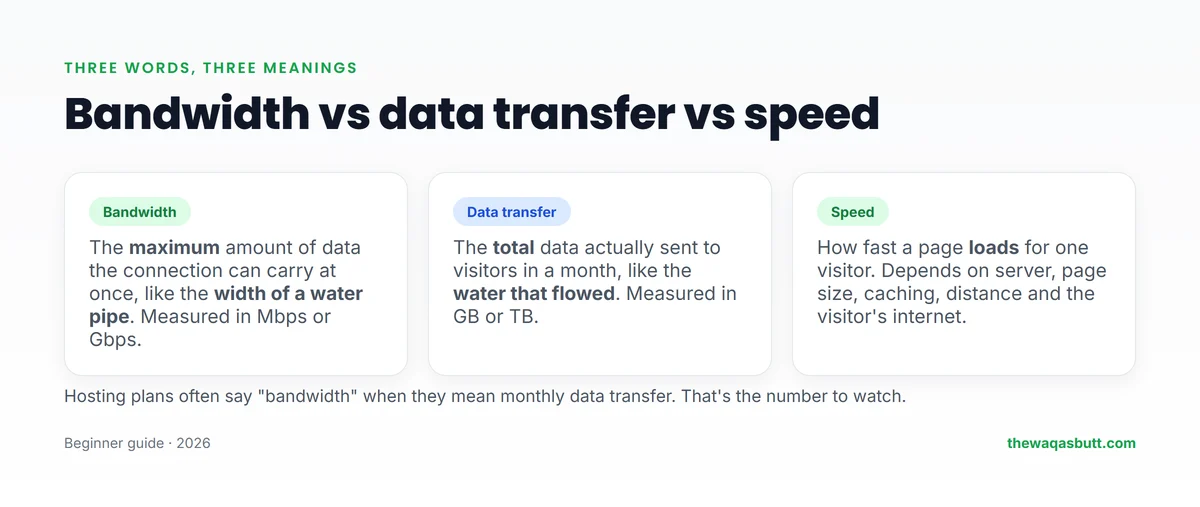
Think of your hosting as a water tank and the internet as pipes. Bandwidth is how much water the pipe can carry at once. Data transfer is how much water actually flows out over a month.
In everyday hosting talk, both words are used for the same thing: how much data your site sends to visitors each month. That’s the number that matters when you compare plans.
Bandwidth vs data transfer vs speed
This is the biggest source of confusion, even in articles from big hosting companies.
| Term | What it means | Measured in | Example |
|---|---|---|---|
| Bandwidth | Maximum data the connection can carry at once | Mbps or Gbps | A 1 Gbps server port |
| Data transfer | Total data actually sent in a period | GB or TB per month | 9 GB used in October |
| Speed | How fast a page loads for one visitor | Seconds | Page loads in 1.2 seconds |
More bandwidth doesn’t automatically make your site faster. A heavy page on a fast server can still load slowly on a visitor’s mobile connection. Lighter pages usually make the biggest difference.
Why is bandwidth important?
- Your site stays online when traffic grows. If you run out of transfer on a limited plan, some hosts slow or suspend the site.
- It affects cost. Plans with low limits can charge extra or push you to upgrade.
- It’s linked to page size. Heavy pages use more data and usually load slower, especially on mobile.
- It matters for your readers. Many visitors worldwide browse on mobile data, where every megabyte costs them money and time.
What uses your bandwidth?
Everything a visitor downloads from your server counts:
- Images: usually the biggest part of a page.
- Code files: HTML, CSS and JavaScript from your theme and plugins.
- Fonts and icons.
- Videos and downloads hosted on your own server, such as PDFs or ZIP files.
- Bots: search engine crawlers and bad bots also download pages, even though they aren’t human visitors.
If you use a CDN (content delivery network), many of these files are served from the CDN’s servers instead of your host, which reduces the load on your hosting plan.
How to calculate how much bandwidth you need
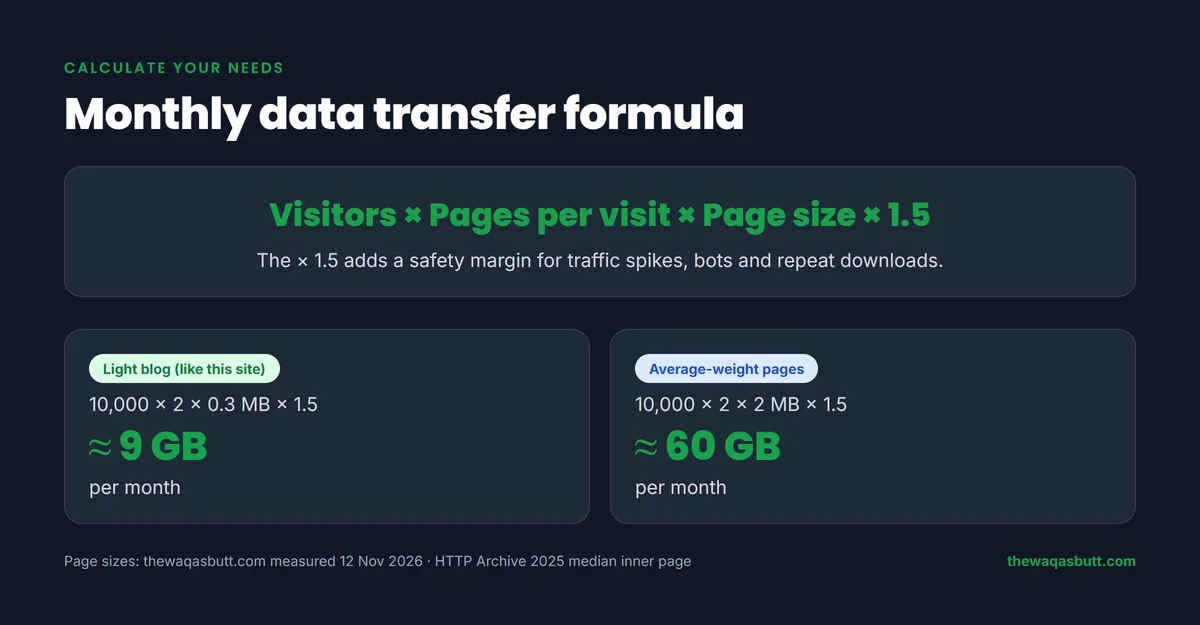
Use this simple formula:
Monthly data transfer = visitors × pages per visit × average page size × 1.5
The × 1.5 is a safety margin for traffic spikes, bots and visitors who download files more than once.
Example: 10,000 visitors a month, 2 pages per visit, 0.3 MB per page:
10,000 × 2 × 0.3 MB × 1.5 = 9,000 MB, about 9 GB a month.
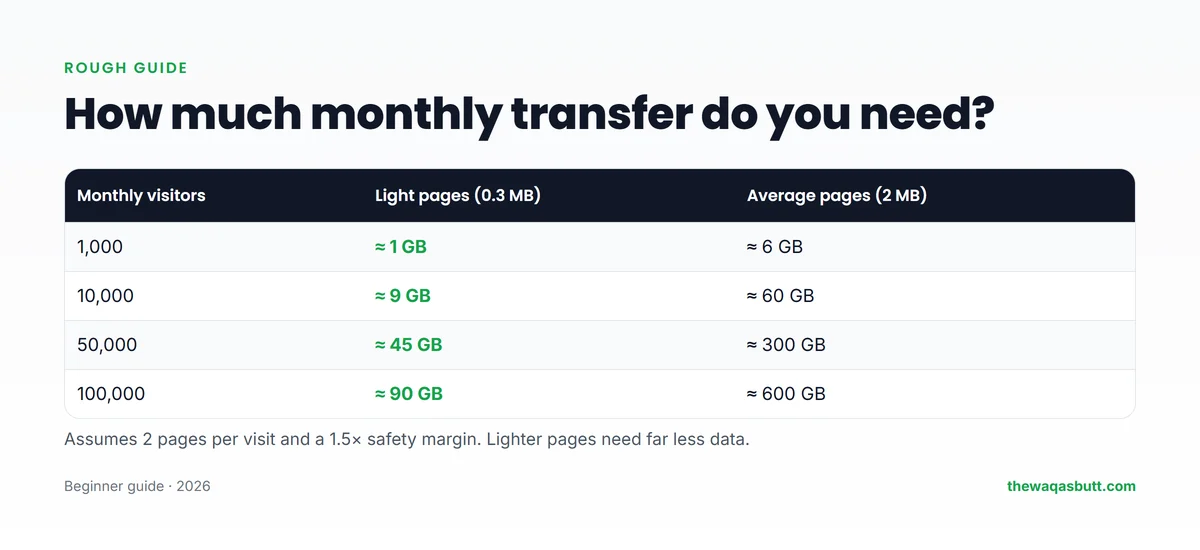
| Monthly visitors | Light pages (0.3 MB) | Average pages (2 MB) |
|---|---|---|
| 1,000 | ≈ 1 GB | ≈ 6 GB |
| 10,000 | ≈ 9 GB | ≈ 60 GB |
| 50,000 | ≈ 45 GB | ≈ 300 GB |
| 100,000 | ≈ 90 GB | ≈ 600 GB |
Notice how much page size matters: the same 10,000 visitors need about 9 GB with light pages, but about 60 GB with average-weight pages.
A real example: this website’s page size
Most guides guess page sizes. I measured this website in a fresh browser on 12 November 2026:
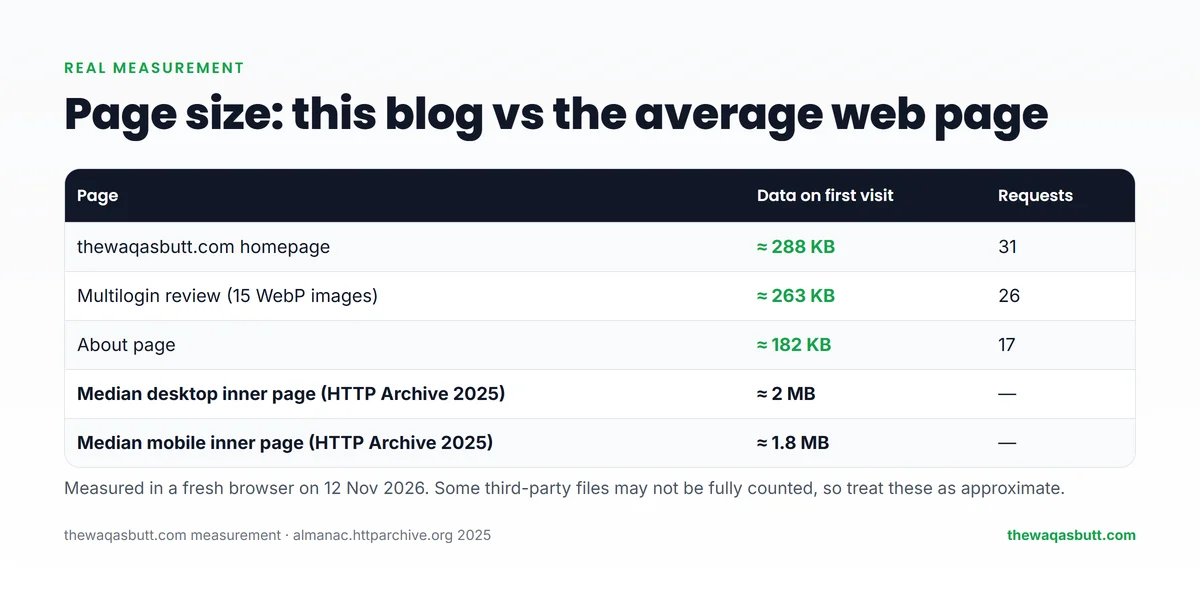
- Homepage: about 288 KB on a first visit (31 requests).
- Multilogin review with 15 WebP images: about 263 KB (26 requests).
- About page: about 182 KB (17 requests).
Compare that with the HTTP Archive Web Almanac 2025, which tracks millions of websites. It found the median inner page weighs about 2 MB on desktop and 1.8 MB on mobile.

So this blog’s pages are roughly 7–10 times lighter than an average page. That’s mostly because every image is converted to WebP, resized, and loaded only when needed. These numbers are approximate; some third-party files may not be fully counted by the browser.
What does “unlimited bandwidth” really mean?
Many shared hosting plans advertise unlimited or unmetered bandwidth. Hostinger’s web hosting page, for example, says you can “handle traffic spikes with unlimited bandwidth” and that it includes a built-in CDN.
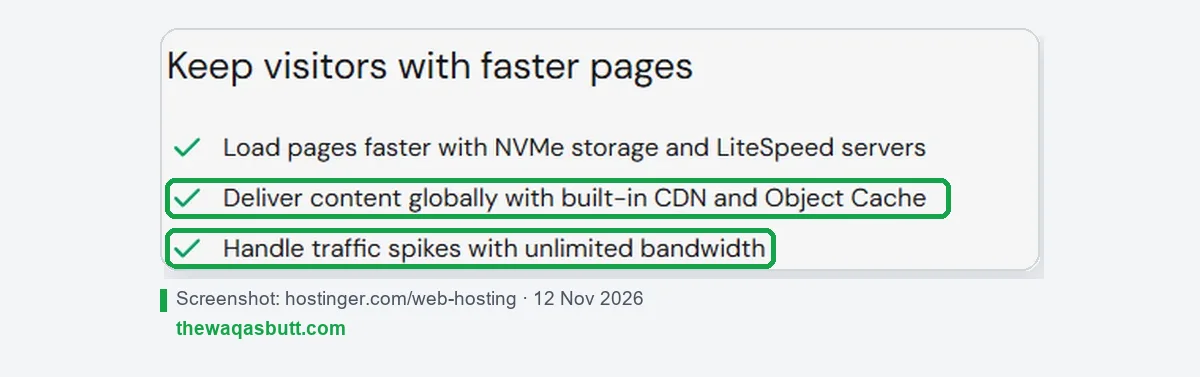
But the same page also says unlimited features are subject to its Fair Usage Policy.

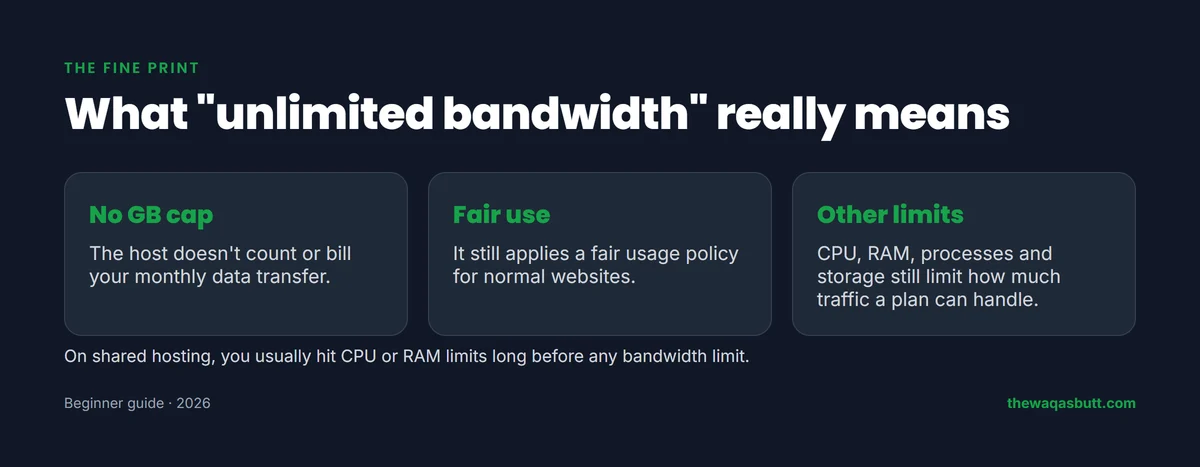
In practice, “unlimited bandwidth” means:
- The host doesn’t count or bill your monthly data transfer.
- A fair usage policy still applies to normal websites.
- Other limits such as CPU, RAM, processes and storage still decide how much traffic a plan can handle.
On shared hosting, you’ll usually hit CPU or RAM limits long before any bandwidth limit. That’s when it’s time to upgrade, for example to cloud hosting.
What happens if you go over your limit?
It depends on the host and plan. Common outcomes include:
- A warning email asking you to reduce usage or upgrade.
- Your site being slowed down (throttled).
- Extra charges for the data over your limit.
- In serious cases, your site being temporarily suspended.
Hostinger’s page also mentions a free 24-hour plan boost for unexpected traffic spikes. Always read your own host’s terms so you know what to expect.
How to reduce bandwidth usage
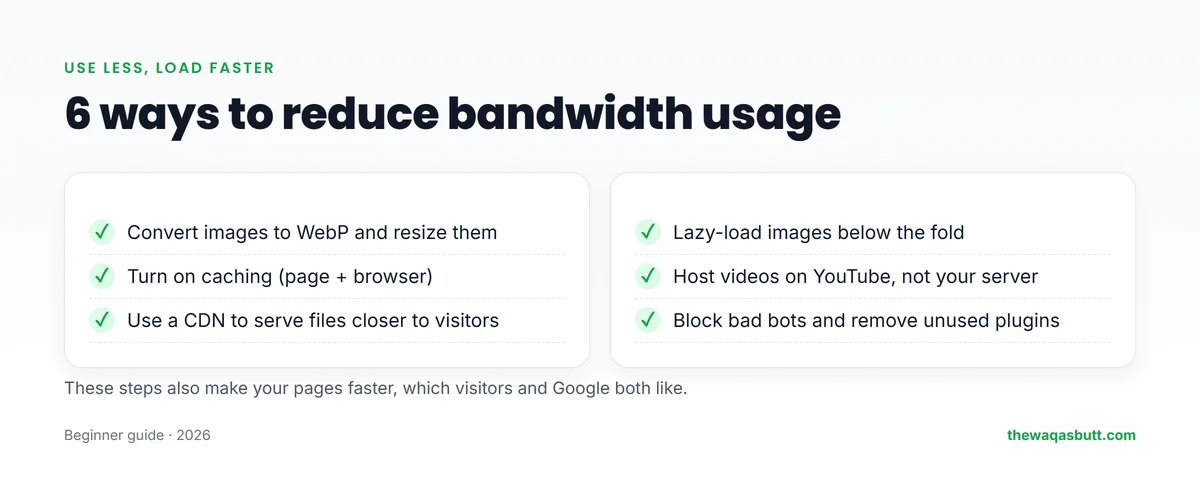
- Convert images to WebP and resize them to the size they’re shown at.
- Turn on caching so repeat visitors don’t download everything again.
- Use a CDN to serve files from servers near your visitors.
- Lazy-load images so they load only when a visitor scrolls to them.
- Host videos on YouTube or another video platform, then embed them.
- Remove unused plugins and block bad bots that waste resources.
These steps also make your site faster, which helps your visitors and your search rankings. If you haven’t set up https yet, see my guide to SSL certificates.
How to check your bandwidth usage
- cPanel hosts: look for Metrics → Bandwidth in your control panel.
- Hostinger: check the resource usage and statistics section of your hosting dashboard.
- CDN dashboards show how much data the CDN served for you.
- Google Analytics or Search Console show visitor numbers, which you can plug into the formula above.
New to hosting? My guide to domain names and web hosting explains how the pieces fit together, and what is blogging covers the bigger picture.
Step by step: finding your website’s bandwidth usage
You can’t manage what you can’t see. There are three places to look, and it’s worth checking more than one because each shows a slightly different picture.
1. Your hosting control panel
This is the most direct source, because it shows what your host actually counts.
- Log in to your hosting account and open the statistics, metrics or resource usage area.
- Look for a chart or table called bandwidth, data transfer or network usage.
- Switch the date range to the current billing period and compare it with the previous one.
- Note your busiest days. Spikes usually point to a popular post, a bot or a large download.
Some hosts show only CPU and memory, because they don’t bill for data transfer. In that case, check those charts instead and read your host’s help pages to see which limits apply.
2. Your CDN analytics
If you use a CDN, its dashboard shows how much data it delivered on your behalf. Remember that the CDN’s number and your host’s number measure different things.
- The CDN number covers files served from the CDN’s own servers.
- The host number covers only what your own server sent.
- A healthy setup shows a large share of the traffic served by the CDN.
3. Estimating from your analytics
If you can’t find a usage chart at all, you can estimate with the formula from earlier in this guide.
- Open your analytics tool and note the pageviews for the last full month.
- Find your average page size. A free page-speed tool or your browser’s developer tools will show it.
- Multiply pageviews × average page size to get a rough monthly total.
- Add a safety margin for bots and repeat downloads.
This is only an estimate, but it’s good enough to tell whether you are comfortably inside your limits or getting close.
Warning signs that your site uses too much bandwidth
You don’t need to watch the charts every day. These signs tell you when to look closer.
- A warning email from your host about resource usage.
- Pages that suddenly load slowly even though you changed nothing.
- A sharp jump in the usage chart that doesn’t match your visitor numbers. This is often bot traffic.
- Very large files such as videos, big PDFs or full-size images being downloaded again and again.
- Other sites embedding your images directly, which makes your server pay for their visitors.
If you see one of these, start with the simple fixes: compress images, turn on caching, use a CDN and block obvious bad bots.
What to do if you reach your bandwidth limit
The earlier section lists what can happen. Here’s what to do about it. The exact rules depend on your host and your plan, so treat the points below as possibilities, not promises.
What your host might do
- Slow your site down until the next billing period begins.
- Charge extra for the data that went over the limit.
- Ask you to upgrade to a bigger plan.
- Temporarily suspend the site if the usage is very high or keeps repeating.
What you should do
- Read your host’s terms and fair usage policy before a problem appears. Look for the section on resource limits and overages.
- Contact support early. Hosts are usually more helpful when you write before the site goes down.
- Find the cause. Check whether one page, one file or one bot is responsible.
- Fix the source with smaller images, caching, a CDN and offloading videos to a video platform.
- Upgrade only if the traffic is real. If your site simply grew, a bigger plan is a good problem to have.
Set a reminder to review your usage regularly, so a limit never arrives as a surprise.
Bandwidth vs storage vs speed: quick recap
These three words appear on every hosting page, and beginners often mix them up. Here is the short version.
- Bandwidth: how much data your site sends to visitors.
- Storage: how much space your files, images, backups and database take on the server.
- Speed: how quickly pages load for a visitor, which depends mostly on page size, caching and server quality.
You can run out of one without running out of the others. A site with a lot of stored files may use almost no bandwidth, and a small site with a viral post can use plenty.
How I researched this guide
- Real measurement: I measured the transfer size of three pages on thewaqasbutt.com in a fresh browser on 12 November 2026.
- Official data: the HTTP Archive Web Almanac 2025 page weight chapter, and Hostinger’s web hosting page for its bandwidth, CDN and fair usage wording.
- Competitor guides: I read the top-ranking bandwidth guides in the US. Most are written by hosting companies, many mix up bandwidth and speed, and few cite real page-size data, so I used measured numbers instead.
Final thoughts
Bandwidth in hosting is the data your site sends to visitors, usually counted per month. It’s not the same as speed, and on most shared hosting it’s no longer the first limit you’ll hit.
For a new blog, focus on light pages, caching and a CDN. With pages around 0.3 MB, even 10,000 visitors a month need only about 9 GB.
If you’re choosing hosting, you can start with Hostinger here and use code SK20 at checkout. For more tools I use, see my resources page.
FAQ
What is bandwidth in web hosting?
It’s the amount of data your website sends to visitors. In hosting plans, it usually means the monthly data transfer limit, measured in GB or TB.
Is bandwidth the same as website speed?
No. Bandwidth is about how much data can be sent; speed is how fast a page loads. Speed depends more on page size, caching, the server and the visitor’s connection.
How much bandwidth does a small blog need?
Use visitors × pages per visit × page size × 1.5. A blog with 10,000 visitors a month, 2 pages per visit and 0.3 MB pages needs about 9 GB a month.
Is unlimited bandwidth really unlimited?
Not completely. The host doesn’t bill per GB, but a fair usage policy and limits on CPU, RAM and processes still apply. On shared hosting, those usually matter first.
What happens if I exceed my bandwidth?
Depending on the host, you may get a warning, slower speeds, extra charges or a temporary suspension. Check your host’s terms for the exact rules.
How can I reduce my website’s bandwidth usage?
Convert images to WebP, enable caching, use a CDN, lazy-load images, host videos on YouTube and remove unused plugins.
Does a CDN save bandwidth?
A CDN serves many of your files from its own servers, which reduces the data your hosting server sends. It also usually makes pages load faster for distant visitors.
Want more simple guides for running your website? Join my newsletter.